The design industry spent the first half of 2026 pretending that “vibe design” would replace the UX department. Meanwhile, product teams are quietly spending entire weeks fixing hallucinated components that shouldn’t exist in the first place. Google Stitch can generate a beautiful single screen from a prompt but the moment you build a real flow, token drift starts breaking the system underneath you.
That’s the actual question behind most searches for google stitch right now. Not “how does it work?” but: Can we ship with this? Or does it just move the cleanup cost to engineering?
If you’ve already watched stakeholders treat Voice Canvas prototypes like production-ready UI, this review will feel familiar. The goal here isn’t hype. It’s figuring out where Stitch accelerates teams and where it quietly slows them down.
Testing Google Stitch With a Multi-Screen Onboarding Flow Prompt
Prompt Used:
Design a multi-screen onboarding flow for a SaaS platform. Include welcome screen, account setup form, team invite screen, and confirmation screen. Maintain consistent layout grid, typography scale, and button styles across all screens.Output:
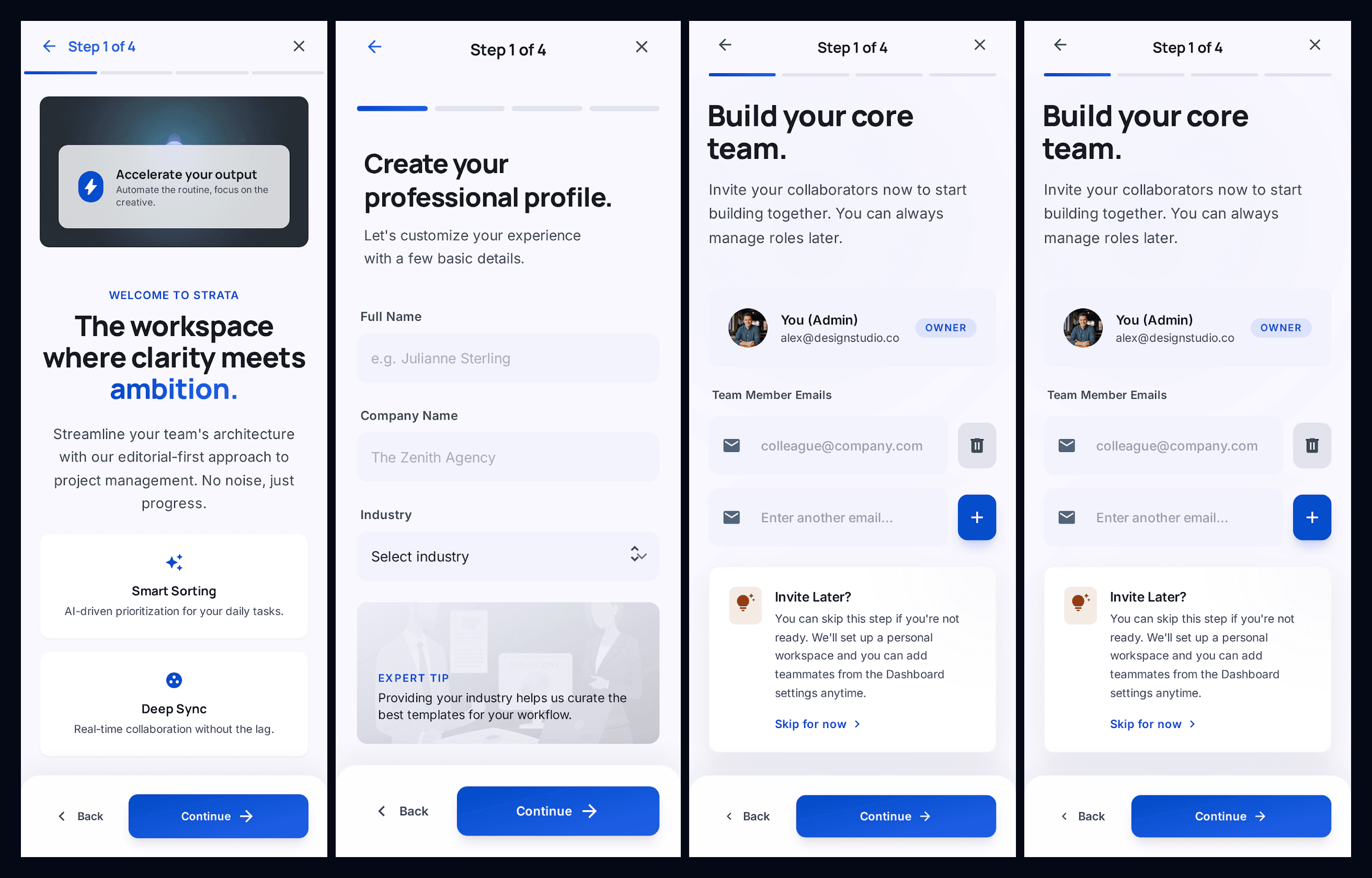
Our Review: It is strong as a first-pass onboarding flow because it maintains consistent typography, spacing, and button styling across screens, and it correctly interprets a realistic SaaS onboarding sequence without extra prompting. However, the flow shows a clear limitation: the third and fourth screens are nearly identical instead of progressing to a confirmation state, which suggests weak step-level flow awareness. The layout itself is also very generic and follows a standard SaaS template pattern, meaning it works for quick exploration but doesn’t create a distinctive product experience without further refinement.
Google Stitch Review 2026: Is Vibe Design Ready for Production?
Google Stitch runs on Gemini 2.5 Flash and Gemini 2.5 Pro and focuses on one thing: generating high-fidelity layouts from prompts, sketches, or screenshots. The March 2026 update introduced Infinite Canvas, Voice Canvas, and DESIGN.md context support.
On paper, that sounds like the end of wireframing.
In practice, it’s the beginning of a different category of problems.
What Changed in the March 2026 Update: Infinite Canvas & Voice
The Infinite Canvas lets teams generate multiple screens from prompts without switching tools. It’s fast enough to produce three layout directions in seconds.
That speed is real. It’s also misleading.
The hierarchy inside those layouts is inferred not enforced. Even with a DESIGN.md file attached, Stitch doesn’t reference your existing component library as a source of truth. Senior designers spot spacing drift and token mismatches immediately.
Voice Canvas pushes the idea further. Instead of editing layouts directly, you describe what you want changed.
That works until you need precision.
Most guides suggest conversational editing replaces structured layout control. That’s wrong because natural language is probabilistic. Production UI is not.
Gemini 2.5 Flash vs. Pro: Understanding the Generation Limits
Google markets Stitch as free. It is—but with operational ceilings:
- 350 generations/month (Flash)
- 200 generations/month (Pro)
That matters more than it sounds.
When every micro-adjustment requires a new prompt, quota becomes your hidden bottleneck. One multi-screen dashboard iteration can burn through a week’s allowance in a single session.
This is why teams experimenting seriously with google stitch review 2026 workflows keep hitting the same wall: exploration looks infinite, but iteration is capped.
The 3 Fatal Flaws of Generative UI Tools
Generative layout systems don’t fail randomly. They fail predictably—and always in the same three places.
Token Drift and the Context Amnesia Crisis
Token drift is what happens when the model forgets your system mid-flow.
Screen one: Perfect spacing. Correct typography. Clean navigation hierarchy.
Screen four: Different button radius. New sidebar pattern. Header weight changed from 600 to 500.
Nothing “broke.” The context window expired.
This is why teams still rely on structured workflows like the ones described in How Designers Actually Use AI in Real Projects instead of pure prompt-driven layout generation.
Large language models generate interfaces probabilistically. They don’t maintain persistent component memory unless the tool enforces it.
So every new screen becomes a negotiation instead of an extension.
The Average Trap: Why AI Interfaces Look Identical
Most prompt-to-UI outputs look like Dribbble SaaS dashboards from 2024.
That’s not coincidence.
Models trained on web-scale datasets converge toward statistically likely layouts. The result:
- predictable card grids
- predictable sidebars
- predictable CTA placement
- predictable typography hierarchy
They optimize familiarity, not differentiation.
If your product depends on visual distinctiveness, Stitch actively works against you.
This is exactly the same pattern teams run into when fighting Blank Canvas Syndrome, AI removes hesitation, but it also narrows originality.
The 2px Problem: Why Prompting is a Terrible UI Interface
Try telling Voice Canvas:
“Increase left padding slightly on the secondary CTA only on mobile.”
The model regenerates the layout instead.
That’s the core mismatch between conversational editing and deterministic systems. Prompting treats adjustment as regeneration.
Production UI treats adjustment as constraint modification.
Serious teams stop prompting earlier than expected and switch to structural editing workflows instead.
Google Stitch vs Figma vs UXMagic: The Design Stack Showdown
Every tool in the 2026 AI UI space solves a different slice of the pipeline.
The confusion starts when teams expect one tool to handle all of them.
Ideation vs. Execution: Where Free AI Tools Create Technical Debt
Google Stitch excels at:
- fast aesthetic exploration
- multi-direction concept generation
- early stakeholder alignment
It struggles with:
- persistent component tokens
- accessibility compliance
- scalable exports
- deterministic iteration
The exported HTML/CSS is functional but rarely production-ready. Inline styles appear where reusable components should exist.
That’s the exact handoff gap covered in Human in the Loop AI Design workflows: AI proposes structure, designers enforce consistency.
Figma sits at the opposite end.
It’s still the industry standard for:
- component systems
- constraints
- responsive logic
- collaboration fidelity
But it assumes the system already exists.
Stitch assumes the system doesn’t matter yet.
UXMagic sits between them.
Instead of generating isolated screens, it treats flows as connected systems. That difference eliminates most context drift before iteration even starts.
How to Fix Inconsistent AI Designs Using UXMagic Flow Mode
Token drift isn’t a prompt problem. It’s a structural architecture problem.
That’s what Flow Mode solves.
Instead of treating every screen as a fresh generation event, Flow Mode locks:
- typography tokens
- spacing rules
- navigation structures
- component variants
So the system evolves instead of resetting.
This is the difference between probabilistic layouts and persistent design logic. It’s the same shift teams make when moving from prompting experiments to workflows like Real Prompts We Use structure first, generation second.
Mastering Two-Way Figma Sync and React Component Exports
Google Stitch exports break at handoff.
Typical problems:
- detached vector layers
- missing auto-layout structure
- inline styling dependencies
- non-semantic HTML
- accessibility gaps
Which means engineers rebuild anyway.
Two-way Figma sync changes that relationship completely. Instead of exporting static snapshots, structured components stay editable across environments.
And React exports stop being approximations they become integration-ready modules.
That’s what turns AI from sketchpad into pipeline tool.
Precision Over Prompts
The fastest workflows in 2026 don’t eliminate manual control.
They localize it.
Sectional editing lets designers regenerate only the parts that need variation instead of rewriting entire layouts through prompts.
That avoids quota burn. It also avoids accidental regressions.
Compare that with Voice Canvas loops where fixing one button mutates three screens.
Precision wins every sprint.
Final Verdict: Is Google Stitch Ready for Enterprise Workflows?
Google Stitch is excellent at generating directions.
It is unreliable at maintaining systems.
Use it for:
- stakeholder alignment
- rapid visual exploration
- pitch concepts
- aesthetic branching
Avoid using it for:
- production component libraries
- multi-screen dashboards
- accessibility-sensitive flows
- React-ready exports
Treat generative UI as a mood board, not a deployment layer.
If your workflow depends on persistent tokens, structured handoff, and deterministic iteration, switch earlier instead of later.
Google Stitch is excellent for fast visual exploration but unreliable for production workflows where consistency, accessibility, and structured components matter. Treat it as a direction-finding tool, not a system-building one. If your team ships multi-screen SaaS interfaces, flow-aware AI tools that preserve tokens and export clean components will save more time than prompt-based layout generation ever can.
Prediction: Within 12 months, teams that treat vibe design as production tooling will spend more time repairing AI output than designing interfaces and the gap between sketch generators and flow-aware systems will become impossible to ignore.
Stop Fixing Token Drift Screen by Screen
Stop fixing token drift screen by screen.