Output Comparison: Side-by-Side Design Quality
Design a modern two-sided marketplace web app for freelancers and clients. Include a homepage with a search bar, featured categories grid, and a section for trending freelancers. Each freelancer card should show profile picture, rating, skills, and ‘Hire’ button. Use a clean, light theme with pastel accent colors and rounded cards.
UXMagic.ai
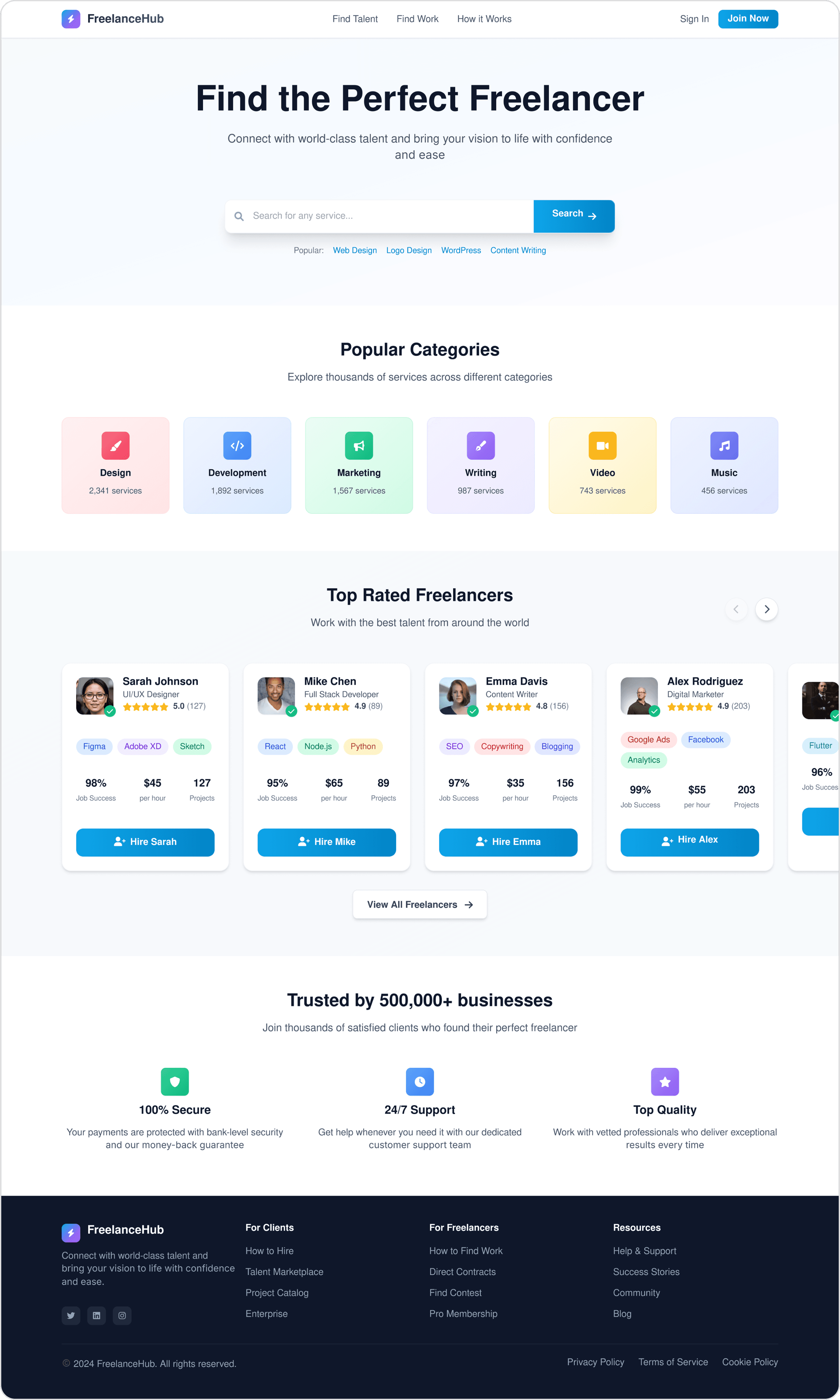
The headline, search bar, categories, and freelancer cards are well-structured, making it easy to scan.
Shows the number of available services per category, adding useful context for users.
While clean, the color palette leans more towards standard SaaS blue/white rather than a distinct pastel tone.
Tags, job success %, hourly rate, and projects all together make the cards slightly dense.
Magic Patterns
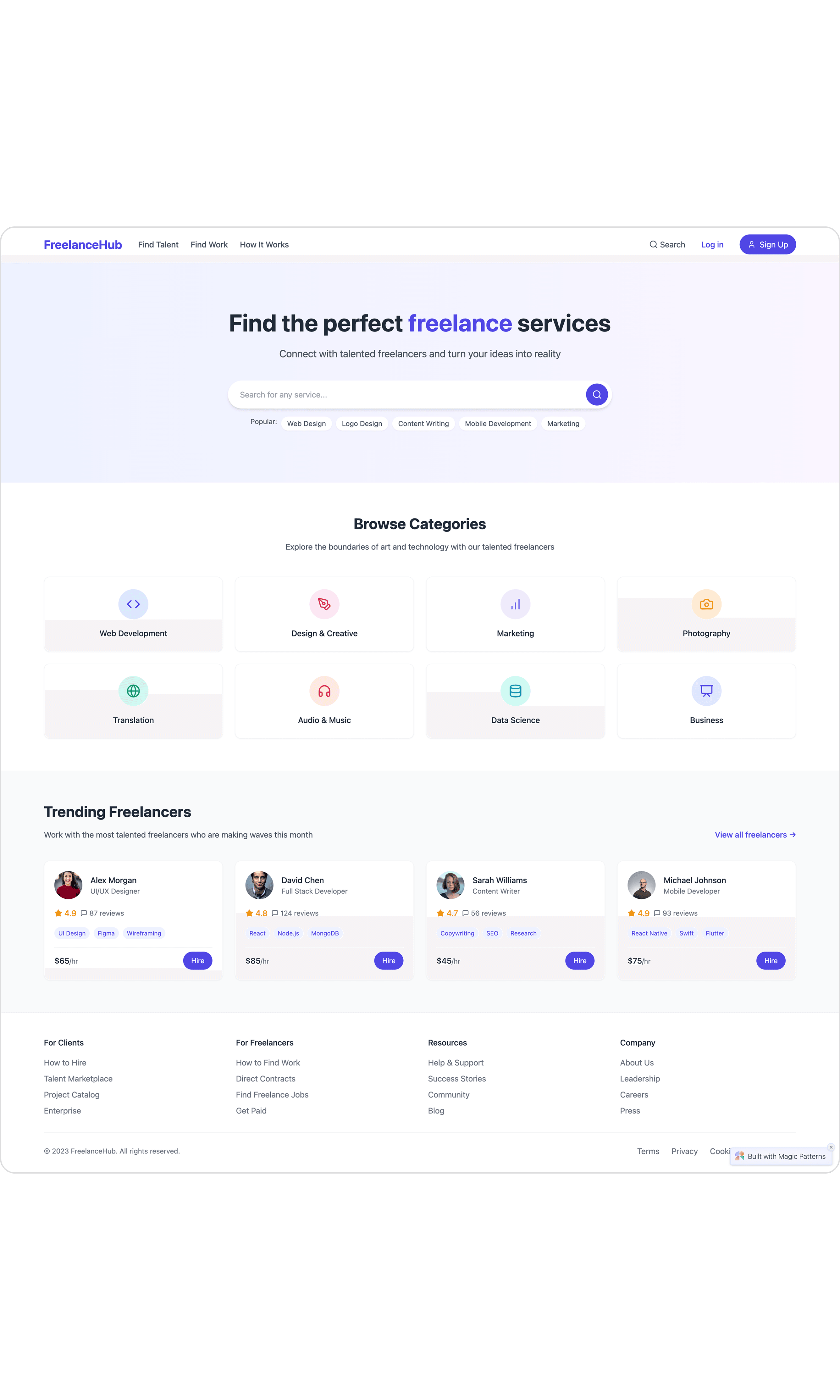
The gradient background and lighter color palette better match the "pastel accents" requirement.
Freelancer cards feel cleaner with more whitespace and minimal information per card.
No indication of how many services exist in each category, losing a useful data point.
The search bar blends into the gradient and feels secondary instead of being a focal point.
Create a mobile-first UI for a short-video sharing platform. Include a vertical video feed with swipe navigation, overlay buttons for like/comment/share, and a bottom navigation bar with Home, Discover, Upload, Messages, and Profile icons. Use a vibrant, playful color palette and bold typography.
UXMagic.ai
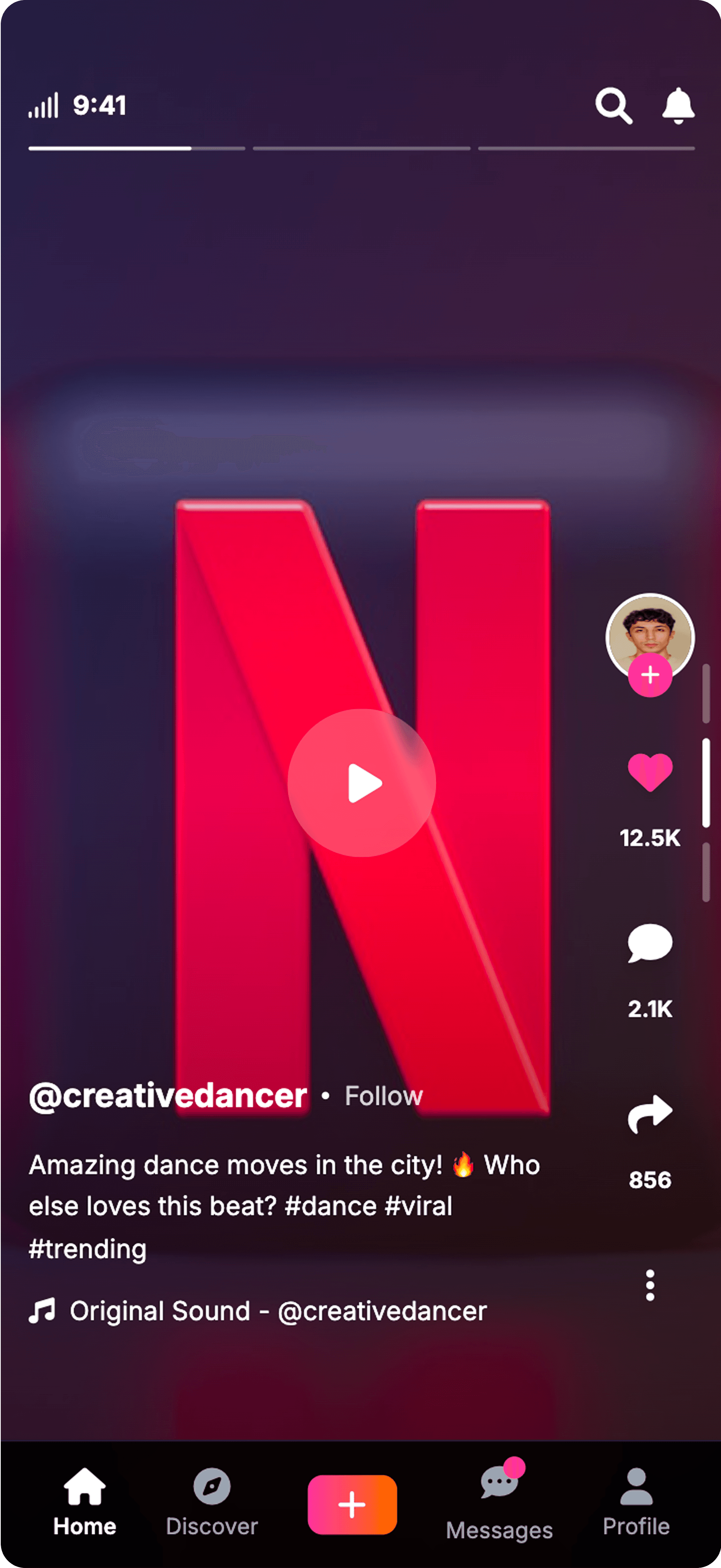
UI has most of the elements that are necessary in the short-video sharing platform
The UI elements are pixel perfect including shapes, icons, typography, etc.
Redundant Navigation bar are present (vertical and horizontal both)
Icons like: search & notification at top right corner were not asked in the prompt.
Magic Patterns
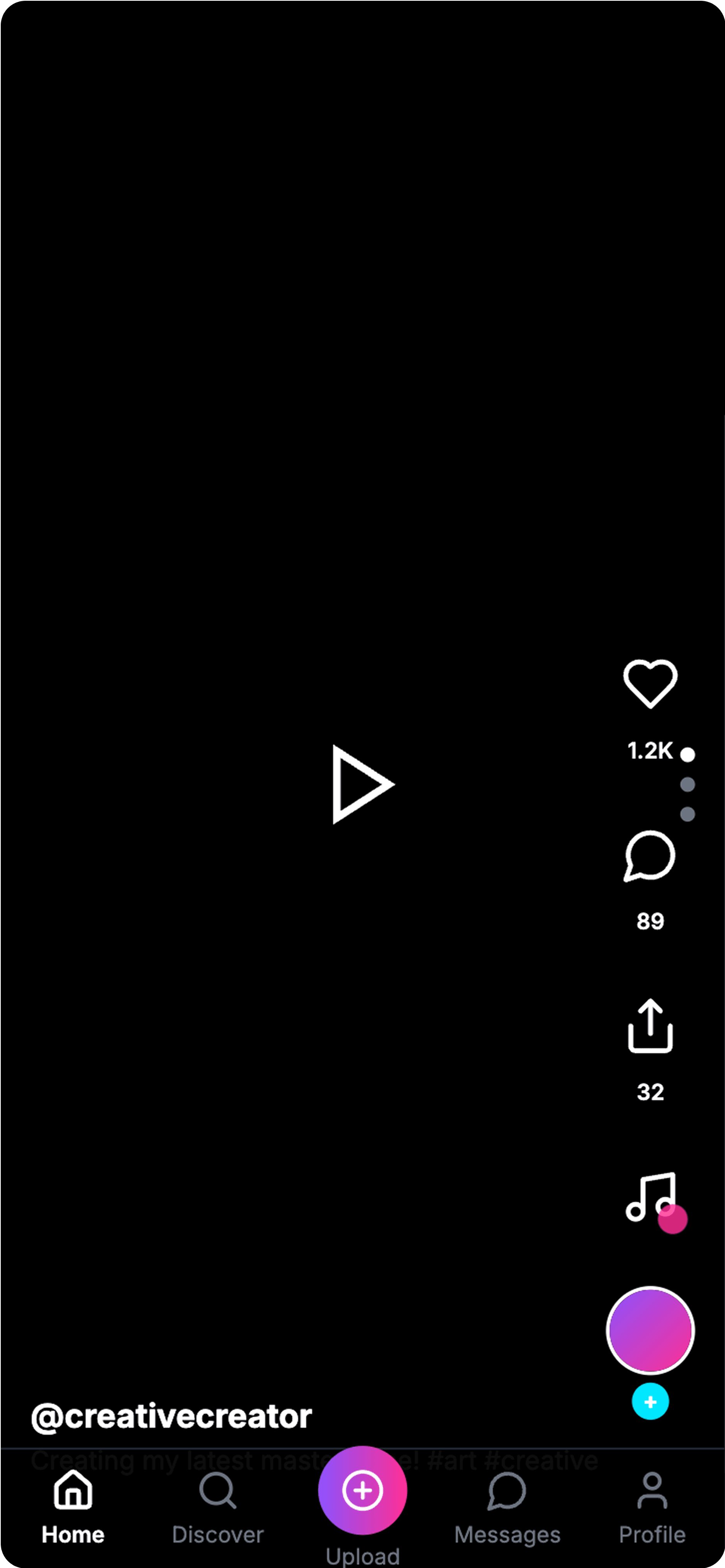
Bottom navigation bar is clear and straightforward with recognizable icons.
Vertical Swipe Navigation is present as requested in the prompt.
Missing UI elements like captions, music name, etc.
The overall look feels too plain and lacks the vibrant, playful color palette requested.

About UXMagic
UXMagic is your AI-powered design copilot, built for creators who need to ship fast. It helps you go from prompt to responsive UI, clone entire websites, or generate screens from images, sketches, or URLs. With support for Figma, React, HTML, Webflow, and more, it’s ideal for teams that design in one tool and build in another. Whether you're ideating or deploying, UXMagic accelerates your entire pipeline. Explore its features or pricing to learn more.

About Magic Patterns
Magic Patterns is a developer-first AI prototyping tool that transforms text prompts, screenshots, and user stories into production-ready React/Tailwind components. Founded in 2023 by ex-Robinhood engineers Alexander Danilowicz and Teddy Ni, it’s built for speed, code quality, and collaboration. With deep design system integration, GitHub sync, and real-time multiplayer editing, Magic Patterns aims to collapse the distance between product idea and coded prototype.
Feature Comparison
| Feature | UXMagic Copilot | Magic Patterns |
|---|---|---|
| Prompt to UI | Generate multi-screen UI from natural language | Generate UI from text prompts |
| Image to UI | Converts images or screenshots into fully editable Figma designs. | Converts screenshots to UI |
| Sketch to UI | Turn hand-drawn sketches into UI | Not available |
| Clone Website to UI | Imports any live website into an editable design via direct URL input. | Not available |
| Connect Existing Figma Designs | Imports existing Figma files for editing and enhancement. | Not available |
| Custom Design System Import | Allows importing brand design systems in Ultimate tier. | Integrates popular open source design systems on all plans. |
| Code Export (HTML/React) | Exports production-ready HTML and React code. | Exports developer-focused React code |
| Apply Style Guide/Branding | Apply consistent design system across screens | Focuses on design system integration instead of style guide. |
| Component Editing | Available (with prompts & Style Guide) | Point & prompt editing |
| Export | One-click export to Figma, Webflow, WordPress, etc. | Support copy paste via plugin only. |
Who should use UXMagic?
Pricing Comparison

Free – $0/month
5 project, 100 free credits (one-time), upto 20 screens, 1 Figma export
Premium – $18/month
20 projects, 480 credits (monthly), upto 80 screens, 80 Figma exports, React/HTML exports
Ultimate – $35/month
Unlimited projects, 1500 credits (monthly), upto 250 screens, 250 Figma exports, unlimited React/HTML exports

Free – $0/month
Lowest messaging limits
Hobby – $15/month
Higher messaging limits
Pro – $60/month
Even higher messaging limits
Final Verdict
In UXMagic vs Magic Patterns, the better choice depends on your team.
If your team is developer-led, values production-ready code, and already works with a defined design system, Magic Patterns will feel like a natural extension of your workflow.
If your workflow revolves around Figma-first design and delivering polished, client-ready visuals, UXMagic is the clear choice. Its broad input options, style guide tools, and export flexibility make it a powerhouse for designers.
For most teams aiming to ship real products, UXMagic offers a better ROI and broader applicability in 2026.
got questions?we have answers.
UXMagic is better for designers thanks to its Sketch-to-UI, Style Guide, and Figma-first workflow.
No, Magic Patterns does not support Figma import, while UXMagic does.
Yes, UXMagic exports HTML and React, but Magic Patterns focuses on cleaner React/Tailwind code.
UXMagic starts at $7/month, while Magic Patterns’ paid plan starts at $19/month.
Yes, UXMagic’s visual-first interface and Figma integration make it more accessible to non-developers.
Checkout our Features







Related comparisons
Weighing up more than one tool? Here is how UXMagic compares against the closest alternatives.