UXMagic vs Galileo AI (Stitch): Which AI Design Tool Wins in 2026?
Google’s acquisition of Galileo AI (now relaunched as Stitch) reshaped the AI design landscape in 2025. Meanwhile, UXMagic has doubled down on being a professional-grade AI design copilot, integrating deeply into production workflows.


Output Comparison: Side-by-Side Design Quality
Design a responsive SaaS dashboard with sidebar navigation, charts, and a dark/light toggle.
UXMagic

Excellent variety of data visualizations provides a comprehensive business overview at a glance.
Strong information hierarchy prioritizes key metrics at the top for quick assessment.
Inconsistent and low-contrast color usage, especially in the table, harms readability and accessibility.
The high density of information and mix of different UI styles create a visually cluttered interface.
Galileo AI
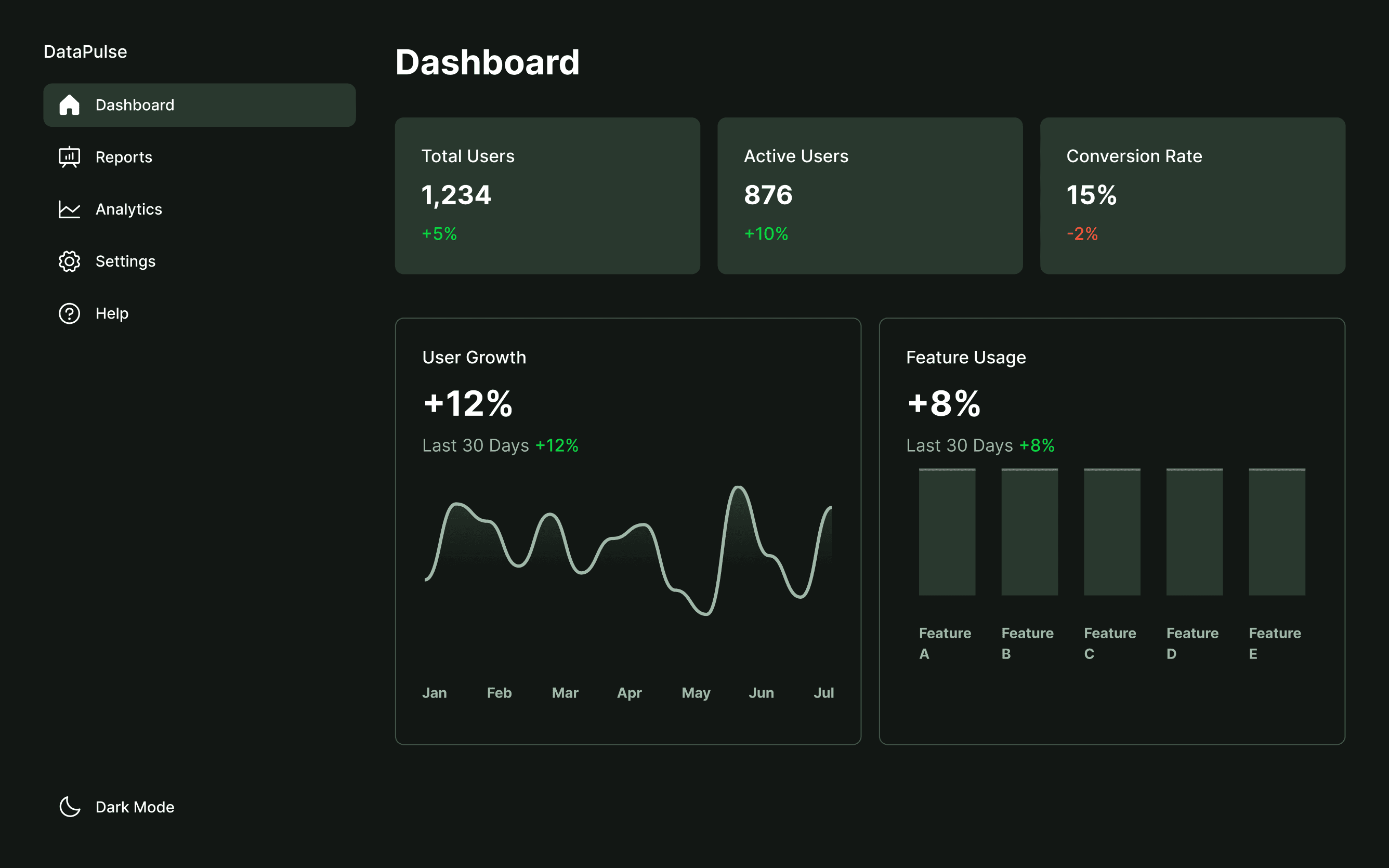
The focused, minimalist design provides exceptional clarity and high readability for key metrics.
A restrained color palette and consistent component styling create a very cohesive aesthetic.
Charts lack necessary labels, tooltips, and context, making the data difficult to interpret accurately.
The layout feels unbalanced, with awkwardly scaled charts that make inefficient use of card space.
Generate a mobile e-commerce checkout flow with address form, payment options, and confirmation screen.
UXMagic
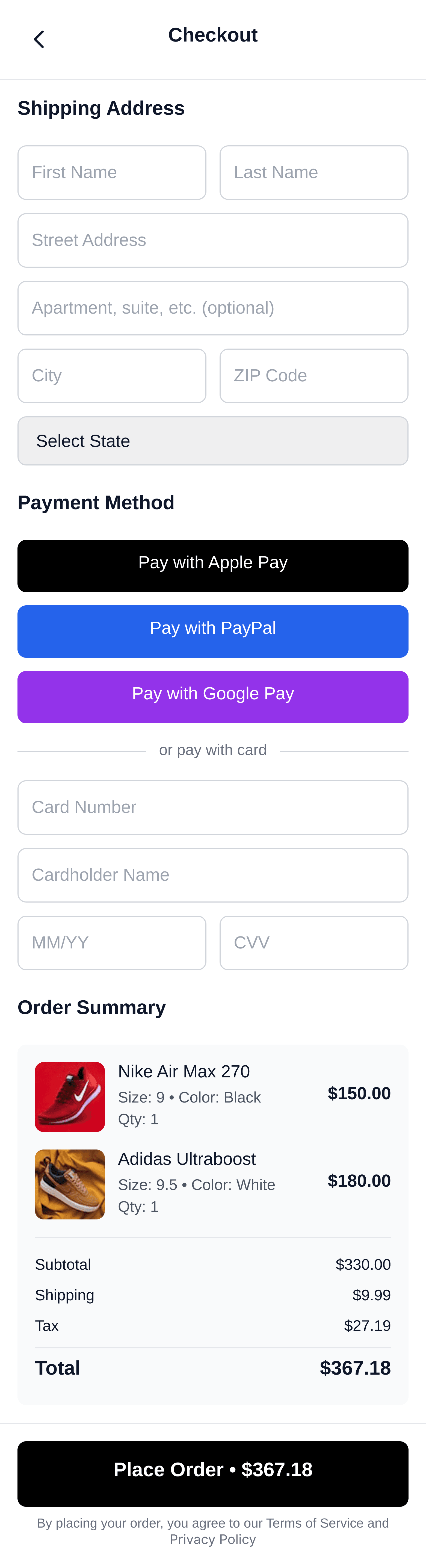
A transparent order summary clearly breaks down all items, attributes, and costs.
Prominent express payment options reduce friction by letting users bypass manual entry.
The single, long-form design creates a high cognitive load that can overwhelm users.
Inefficient form layout with stacked fields makes the page feel unnecessarily long.
Galileo AI
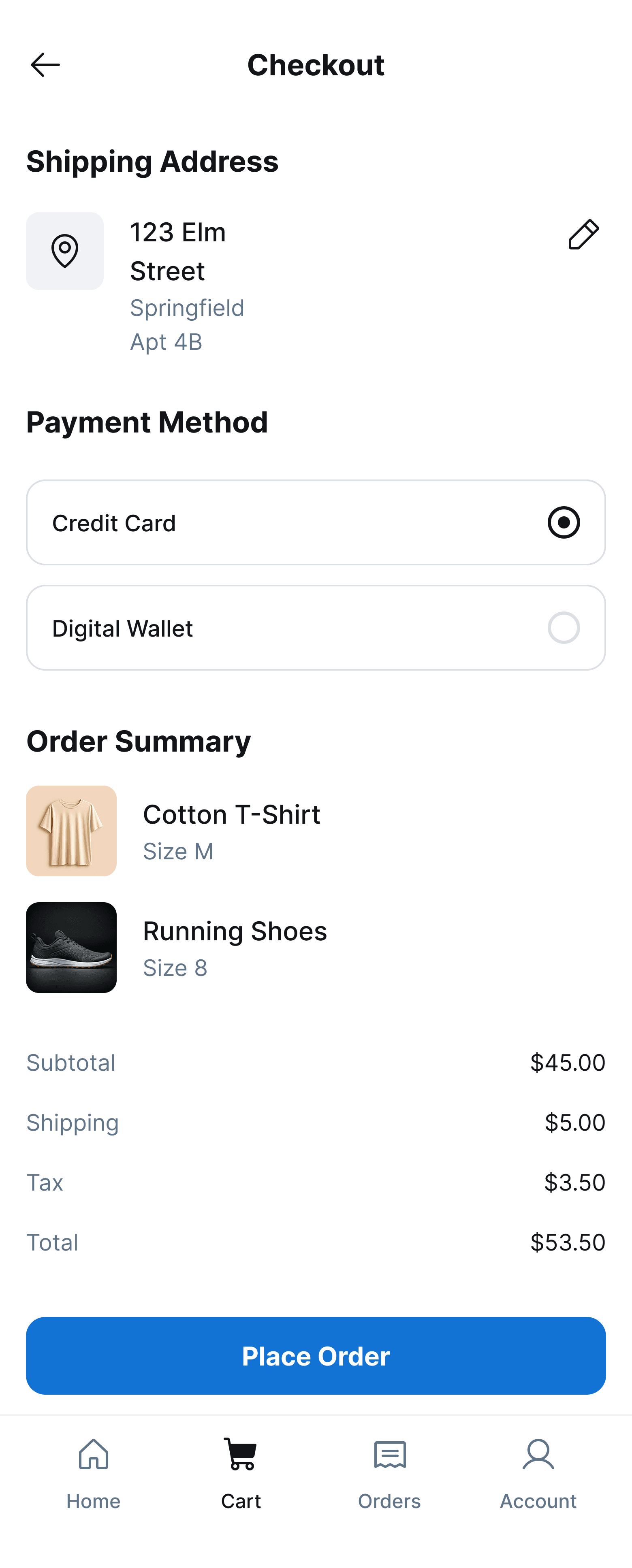
The low-friction design with pre-filled info provides an excellent, fast checkout for returning users.
Saved information is displayed in clean, scannable cards with clear, mobile-friendly controls.
The order summary lacks critical details like individual item prices and a full cost breakdown.
The CTA button misses the opportunity to include the final price for last-moment user reassurance.
UXMagic
UXMagic is your AI-powered design copilot, built for creators who need to ship fast. It helps you go from prompt to responsive UI, clone entire websites, or generate screens from images, sketches, or URLs. With support for Figma, React, HTML, Webflow, and more, it's ideal for teams that design in one tool and build in another. Whether you're ideating or deploying, UXMagic accelerates your entire pipeline. Explore its features or pricing to learn more.
Galileo AI
Originally founded in 2022 as Galileo AI, the tool was acquired by Google in May 2025 and rebranded as Stitch. It’s now a free, Google Labs product designed to showcase the power of Gemini models. Stitch excels at fast, high-fidelity mockups for brainstorming, prototyping, and pitches, but it lacks the deep workflow features that professional teams require.
Feature Comparison
| Feature | UXMagic | Galileo AI (Stitch) |
|---|---|---|
| Prompt to UI | Supports text, image, sketch, and URL cloning | Supports text, image, and sketch |
| Export Options | Figma, React, HTML, with Webflow/Framer roadmap | Figma, generic HTML/CSS/JSX |
| Style Guide | Apply brand style guide instantly across screens | Only basic theme (color, font, radius) |
| Component Editing | Sectional editing + component libraries | Limited refinement via chat |
| Figma Plugin | Two-way sync with projects + component libraries | One-way “paste to Figma” |
| Real-Time Preview | Yes, with production-ready code preview | Limited visual previews only |
| Unique Edge | Workflow moat: cloning, exports, system integration | Zero-cost, polished ideation |
UXMagic
Pricing Comparison

Free – $0/month
5 project, 120 free credits (one-time), upto 20 screens, 1 Figma export
Premium – $18/month
20 projects, 480 credits (monthly), upto 80 screens, 80 Figma exports, React/HTML exports
Ultimate – $35/month
Unlimited projects, 1500 credits (monthly), upto 250 screens, 250 Figma exports, unlimited React/HTML exports
Free – $0
limited features since it's on beta (Stitch)
Final Verdict
In the battle of UXMagic vs Galileo AI (Stitch), the winner depends on your stage:
If you need free, fast ideation and polished mockups for early pitches → Galelio (Google Stitch) is unbeatable.
If you need production-ready workflows, code exports, and style consistency for real products → UXMagic is the smarter investment.
In short: Stitch shines in the first mile, UXMagic dominates the last mile.
got questions?we have answers.
BoldGalileo AI (Stitch) is free and great for ideation, while UXMagic focuses on production workflows with exports, Figma sync, and system integration.
No, the original site redirects to Google’s Stitch. If you search for “galileo ai ui design”, you’ll now find Stitch by Google.
Developers benefit more from UXMagic since it generates clean React/HTML code. Stitch provides mockups but less production-ready output.
Not exactly—Stitch is free for brainstorming, while UXMagic is a paid tool built for real-world shipping. Many teams may benefit from both.
Currently, yes. But as a Google Labs project, its future pricing or availability is uncertain.



Related comparisons
Weighing up more than one tool? Here is how UXMagic compares against the closest alternatives.