UXMagic vs Emergent: AI UI Generator or Full-Stack AI Builder?
Choosing between UXMagic and Emergent comes down to whether you need polished AI-generated interfaces or complete AI-built applications. While both platforms speed up product creation with AI, they serve different purposes. Emergent generates full-stack applications with frontend, backend, APIs, databases, and deployment, while UXMagic specializes in production-ready user interfaces from prompts, screenshots, sketches, URLs, and Figma workflows. In this UXMagic vs. Emergent comparison, we'll compare features, pricing, workflows, outputs, and use cases to help you choose the right platform.


Output Comparison: Side-by-Side Design Quality
Design a single desktop screen for an AI-powered travel planning application for multi-city international trips. Include a navigation sidebar, destination search, trip overview, itinerary timeline, AI travel recommendations, a map preview, and a travel checklist. Use a clean modern SaaS style with a blue-green color palette, premium typography, rounded cards, subtle shadows, consistent spacing, and realistic travel data to create a polished interface optimized for a 1440px desktop.
UXMagic.ai
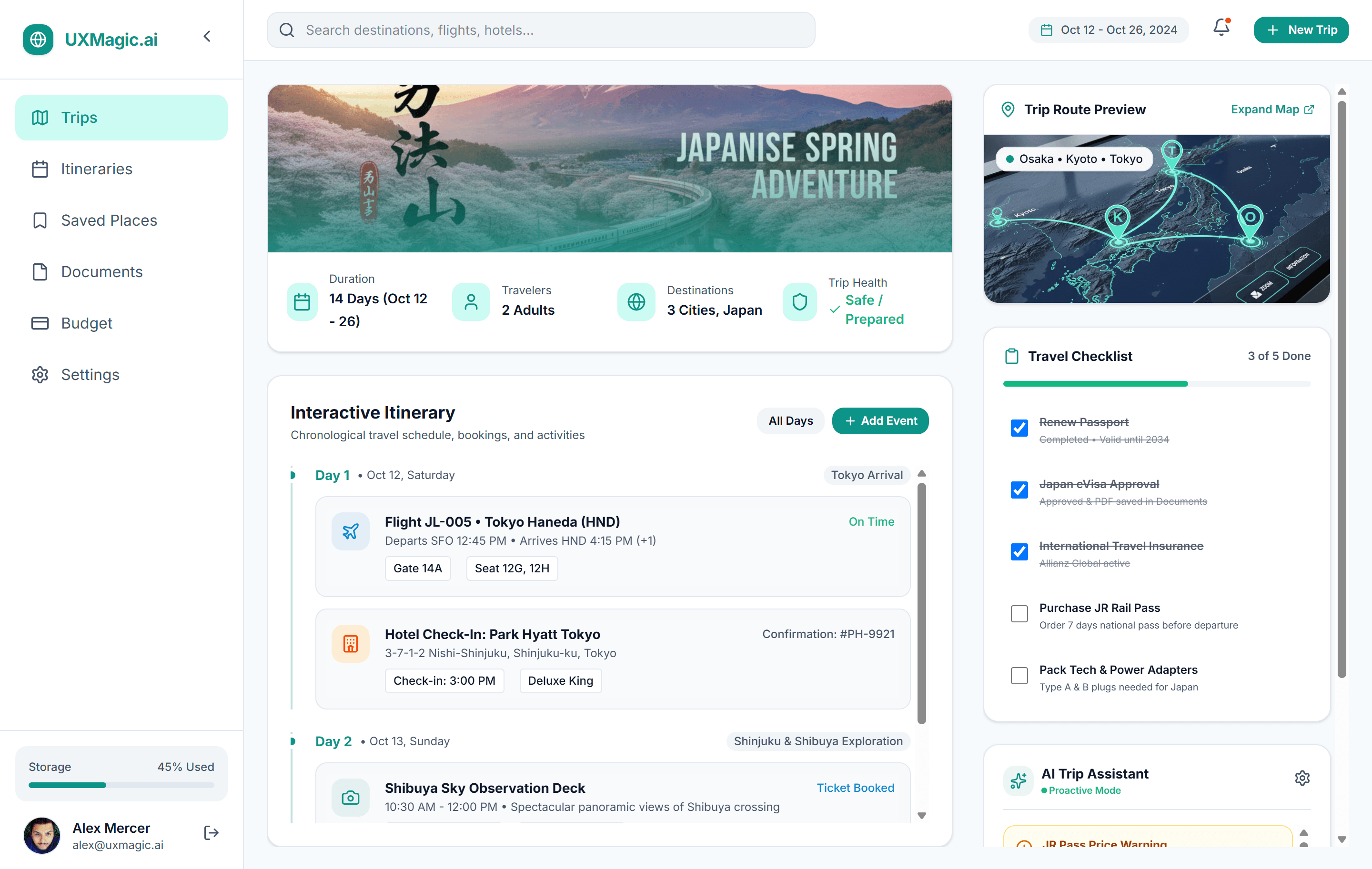
Covers all prompt requirements with a complete travel planning workflow.
Clear information hierarchy with well-organized sections.
The itinerary section dominates the screen.
The layout feels slightly content-heavy.
Emergent
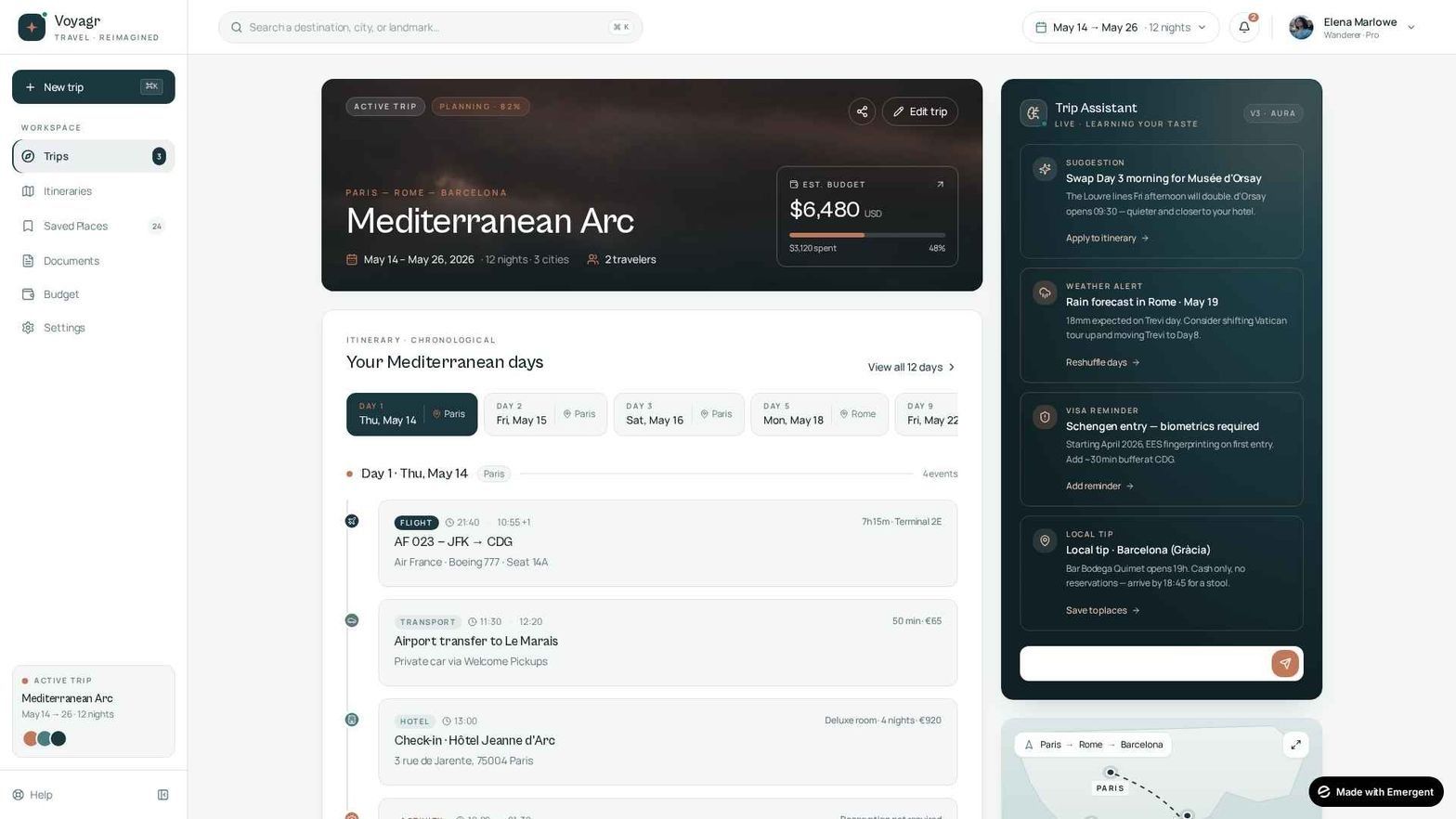
Elegant, minimal design with excellent visual balance.
AI recommendations are clear and easy to scan.
Missing the travel checklist from the prompt.
Trip overview lacks the level of detail requested.
Design a single desktop screen for an AI-powered patient portal for a multi-specialty hospital. Include patient information, today's care plan, a medical timeline, AI health insights, lab reports, and key health metrics, along with a top navigation bar featuring search, notifications, language selection, and a patient profile. Use a clean, modern healthcare aesthetic with blue and teal tones, rounded cards, accessible typography, subtle shadows, and consistent spacing for a polished 1440px desktop experience.
UXMagic.ai

Clear visual hierarchy with excellent information organization.
Covers all major healthcare workflows in a single screen.
The layout feels slightly content-heavy.
The AI panel takes up considerable screen space.
Emergent

Clean, spacious layout with strong readability.
Simple design makes navigation intuitive.
Misses several prompt-required sections.
Less detailed and feature-complete overall.
About UXMagic
UXMagic is an AI-powered UI and UX generation platform designed to help designers, founders, product teams, and agencies move from idea to production-ready interfaces in minutes. It enables users to generate responsive designs from prompts, screenshots, sketches, live URLs, and existing Figma files while maintaining consistency through reusable components and design systems. With powerful features like Website Clone, Flow Mode for multi-screen generation, auto-generated style guides, editable Figma exports, and React and HTML code exports, UXMagic streamlines the entire design workflow from ideation and rapid prototyping to developer handoff making it easier to create high-quality interfaces faster without compromising on design quality. Explore its features or pricing to learn more.
About Emergent
Emergent is an AI-native software engineering platform that enables users to build complete web and mobile applications from natural language prompts. Powered by a multi-agent system—including Architect, Designer, Developer, Integration, and Product Manager agents—it generates frontend interfaces, backend services, APIs, authentication, databases, and deployment infrastructure. Its conversational workflow helps founders, developers, and businesses rapidly create functional applications with minimal coding, while its Wingman AI extends automation across tools like Slack, WhatsApp, Gmail, and CRM platforms. Unlike UXMagic, which focuses on professional UI design and frontend workflows, Emergent is built for end-to-end software generation and deployment.
Feature Comparison
| Feature | UXMagic | Emergent |
|---|---|---|
| Prompt to UI | Generates complete responsive UI layouts from natural language prompts | Generates complete applications from conversational prompts, including frontend and backend |
| Screenshot to UI | Converts screenshots into editable UI designs | Not available |
| Sketch to UI | Converts hand-drawn wireframes into structured interfaces | Not available |
| Website Cloning | Clone websites from URLs into editable UI designs | Not available |
| Figma Import/Export | Fully editable Auto Layout exports & imports | No native Figma export |
| Code Export | React, HTML, Webflow, Framer | React, Next.js, FastAPI, MongoDB |
| Style Guide Creation | Automatically generates design tokens and reusable style guides | Generates styles dynamically from prompt context |
| Component Editing | Visual editing with AI regeneration of individual sections | Conversational editing through prompts |
| Multi-Screen Generation | Flow Mode generates complete user journeys | Generates complete application flows through conversation |
| GitHub Integration | Export code to GitHub is available | Two-way GitHub integration |
| Developer Handoff | Editable Figma files and clean frontend exports | Complete source code and GitHub synchronization |
| Learning Curve | Beginner-friendly for designers and founders | Better suited for technical users and product builders |
Who should use UXMagic?
Pricing Comparision

Free – $0/month
5 projects, 30 free credits (one-time), upto 5 screens, 1 Figma export
UXMagic Pro – $17.5/month
Unlimited projects, 1200 credits (monthly), upto 200 screens, 250 Figma exports, React/HTML exports
Enterprise – Custom
Custom credits based on team plan, Everything in Pro, plus

Free – $0 / month
10 free monthly credits
Standard – $20 / month
100 credits per month
Pro – $200 / month
750 Monthly Credits
Final Verdict
The UXMagic vs. Emergent comparison comes down to your primary goal. UXMagic is built for designers and product teams that need polished, production-ready interfaces with Figma support, reusable design systems, and frontend exports, while Emergent focuses on generating complete applications with frontend, backend, APIs, databases, and deployment. Both platforms accelerate product development, but UXMagic excels at UI design workflows, whereas Emergent is better suited for end-to-end software development.
Choose Emergent if your goal is to build complete, deployable applications with minimal coding. It's best suited for non-technical founders, solo developers, engineering teams, and businesses building internal tools or rapid SaaS MVPs. With AI-powered backend generation, APIs, databases, authentication, and deployment, Emergent is ideal when application functionality takes priority over pixel-perfect UI design.
Choose UXMagic if your priority is creating polished, production-ready interfaces with speed and consistency. It's ideal for designers, agencies, startups, product teams, and frontend developers who rely on Figma-first workflows, reusable design systems, and seamless developer handoff. UXMagic helps teams turn ideas into high-quality UI faster while maintaining brand consistency across projects.
For most product teams, UXMagic offers a faster and more flexible workflow for UI and frontend design with AI-powered generation, multiple input methods, editable Figma exports, and predictable pricing. Emergent, on the other hand, excels at AI-driven software engineering, enabling users to build complete applications with backend logic, APIs, databases, and deployment. While both platforms accelerate product creation, UXMagic is the stronger choice for professional UI design, whereas Emergent is better suited for end-to-end software development.
got questions?we have answers.
Yes. If your primary focus is creating high-quality user interfaces, UXMagic is the better choice. It offers greater control over layouts, components, typography, branding, and design systems, along with features like Sketch to UI, Screenshot to UI, Website Clone, Sectional Editing, and native Figma integration, making it ideal for designers and frontend teams.
The biggest difference is their focus. UXMagic is built for AI-powered UI design and frontend workflows, while Emergent is a full-stack AI development platform that generates complete applications with backend infrastructure, APIs, authentication, databases, and deployment.
Not completely. While Emergent can generate user interfaces as part of a full-stack application, it isn't designed for pixel-perfect UI design, Figma-based workflows, or design system management. Teams that prioritize visual consistency and collaborative design will benefit more from UXMagic.
It depends on your goals. If you're building a functional MVP with backend services and deployment, Emergent is a strong choice. If your focus is designing polished interfaces, improving frontend quality, and maintaining a scalable design system, UXMagic offers greater long-term value.
Compared to tools like Google Stitch and OpenClaw, UXMagic provides a more complete UI design workflow with deep Figma integration, multiple input methods, design system support, component-level editing, and production-ready React and HTML exports. It's built for teams creating production-ready interfaces rather than just generating design concepts.
Checkout our Features



Related comparisons
Weighing up more than one tool? Here is how UXMagic compares against the closest alternatives.