UXMagic vs Pencil.dev: AI Design Generator or Code-First UI Builder?
UXMagic and Pencil.dev take different approaches to AI-powered UI creation. UXMagic generates editable designs and code from prompts, screenshots, sketches, URLs, and Figma files, while Pencil.dev brings visual design directly into VS Code and Cursor. This UXMagic vs Pencil.dev comparison explores features, workflows, pricing, and use cases to help you choose the right platform.


Output Comparison: Side-by-Side Design Quality
Design a single-screen online learning workspace for a professional certification platform. Include a course progress tracker, video lesson player area, lesson navigation sidebar, downloadable resources section, notes panel, upcoming assignments, discussion forum preview, achievement badges, and a course completion timeline. Use a modern educational design system with accessible typography, responsive layout, reusable components, clear content hierarchy, and production-ready frontend structure.
UXMagic.ai

Well-organized learning workflow and navigation.
Consistent design system across all sections.
The video section takes up too much screen space.
Community and engagement features lack emphasis.
Pencil.dev

Strong learning-focused layout with all key elements visible above the fold.
Clear content hierarchy makes navigation and progress tracking intuitive.
Video player occupies excessive screen space compared to supporting content.
Discussion forum and achievements feel visually underemphasized.
Design a single-screen patient portal dashboard for a healthcare platform. Include patient profile information, upcoming appointments, medication schedule, recent test results, secure messaging center, health metrics cards, insurance summary, and emergency contact section. Use a trustworthy, accessible design with clear information hierarchy, responsive layout, reusable components, WCAG-compliant contrast, and production-ready frontend structure.
UXMagic.ai

Clear and well-structured information layout.
Strong trust and professionalism in the visual design.
Important alerts could be more prominent.
The interface feels slightly crowded with content.
Pencil.dev
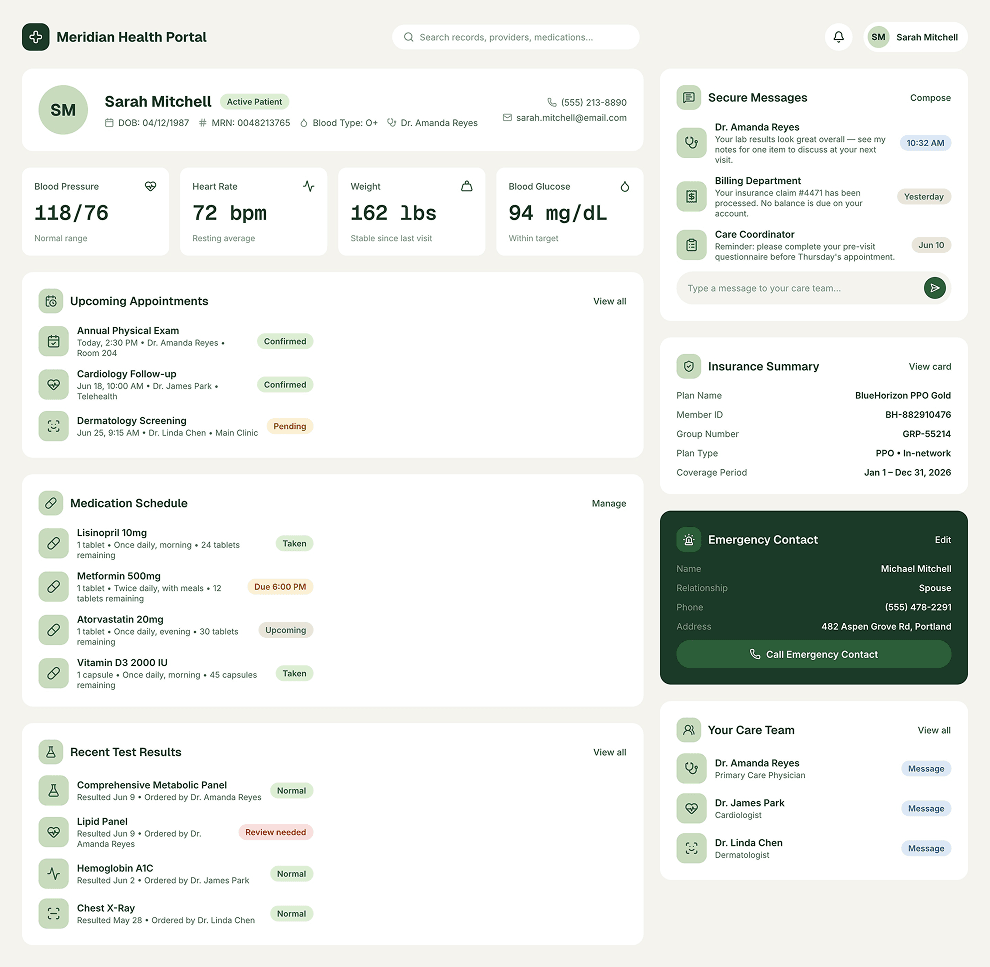
Well-organized healthcare information with easy-to-scan sections.
Consistent visual design creates a trustworthy and professional experience.
Health metrics and critical alerts lack stronger visual prioritization.
Large empty content areas make parts of the dashboard feel underutilized.
About UXMagic
UXMagic is an AI-powered UI and UX design platform that helps teams turn ideas into production-ready interfaces faster. Users can generate designs from natural language prompts, screenshots, hand-drawn sketches, website URLs, and Figma files. Beyond UI generation, UXMagic offers structured design workflows with Flow Mode, automated style guides, sitemap generation, Figma integration, React and HTML exports, and real-time collaboration. It is built for designers, developers, founders, agencies, and product teams that need to quickly validate, iterate, and ship products. Explore the full range of features or visit the pricing page to find the plan that fits your workflow.
About Pencil.dev
Pencil.dev is an AI-native design environment created specifically for developers who want visual design tools embedded directly inside their coding workflow. Operating within IDEs such as VS Code and Cursor, Pencil.dev uses Git-versioned .pen files and Model Context Protocol (MCP) integrations to connect visual designs with AI coding agents like Claude Code. Its core value lies in reducing the gap between design and implementation by allowing developers to generate, edit, and manage UI components without leaving their development environment. With support for design systems, Prompt Blocks, and high-fidelity React and Tailwind code generation, Pencil.dev is best suited for frontend engineers, design systems teams, and AI-native developers who prioritize code-centric workflows over traditional browser-based design collaboration.
Feature Comparison
| Feature | UXMagic | Pencil.dev |
|---|---|---|
| Prompt to UI | Generates complete responsive interfaces from prompts | Generates interfaces through IDE-based prompts |
| Image to UI | Converts screenshots into editable designs | Not a core workflow |
| Sketch to UI | Converts hand-drawn sketches into UI layouts | Limited support |
| URL to UI | Clone and recreate existing websites | Not available |
| Flow Generation | Multi-screen user journeys with Flow Mode | Focused on individual screens and components |
| Style Guide Generation | Automatic style guides and token consistency | Depends on connected UI Kits |
| Figma Export | Structured Auto Layout exports | One-way Figma copy workflows |
| Figma Import | Supports importing and editing Figma designs | Limited integration |
| Setup Required | Works instantly in browser | Requires IDE setup and MCP configuration |
| AI Engine | Built-in AI generation | Depends on external AI agents |
Who should use UXMagic?
Pricing Comparision

Free – $0/month
5 projects, 30 free credits (one-time), upto 5 screens, 1 Figma export
Premium – $17.5/month
20 projects, 480 credits (monthly), upto 80 screens, 80 Figma exports, React/HTML exports
Ultimate – $35/month
Unlimited projects, 1500 credits (monthly), upto 250 screens, 250 Figma exports, unlimited React/HTML exports
Free – $0/month
Final Verdict
Both UXMagic and Pencil.dev aim to accelerate the journey from design to production, but they approach the problem from different directions. Pencil.dev is built for developers who want visual design capabilities directly inside their IDE, while UXMagic is designed as a complete AI-powered product design platform that supports ideation, validation, collaboration, and code generation. The right choice depends on whether your biggest bottleneck is engineering implementation or cross-functional product design and validation.
Choose Pencil.dev if your team primarily consists of developers working inside VS Code or Cursor and you want design capabilities embedded directly into your coding environment. Its Git-versioned visual files, MCP integrations, and close connection to AI coding agents make it a strong choice for frontend engineers, design systems teams, and AI-native development workflows. Pencil.dev is best suited for organizations focused on minimizing design-to-code translation inside existing repositories.
Choose UXMagic if you need a flexible AI design platform that can generate interfaces from prompts, screenshots, sketches, URLs, and Figma files. It is ideal for product teams, designers, founders, agencies, and developers who want to collaborate, validate ideas quickly, maintain design consistency, and export production-ready Figma files, React code, or HTML. UXMagic is particularly valuable when multiple stakeholders are involved and rapid iteration is more important than IDE-native workflows.
For most product teams, UXMagic provides a more complete and versatile workflow, covering everything from concept exploration and stakeholder alignment to Figma exports and production-ready code generation. Pencil.dev excels in a more specialized niche, offering a developer-first experience that integrates tightly with modern AI-assisted coding environments. If your goal is to design, validate, collaborate, and ship products faster across teams, UXMagic is the stronger choice. If your priority is keeping design and code tightly connected within an IDE-centric workflow, Pencil.dev is a compelling option.
got questions?we have answers.
UXMagic is generally better for designers because it supports Figma workflows, style guides, collaboration, sketches, screenshots, and URL-based generation. Pencil.dev is more developer-focused.
Both platforms produce high-quality frontend outputs. Pencil.dev benefits from deep IDE integration, while UXMagic focuses on generating deployable React and HTML exports directly from generated designs.
Pencil.dev currently offers free access, but users often require external AI subscriptions such as Claude Code, which introduce additional costs.
For many product teams, yes. UXMagic covers design generation, validation, collaboration, Figma exports, and frontend code generation without requiring IDE setup.
UXMagic is typically the stronger choice for agencies because it supports collaboration, stakeholder reviews, client sharing, Figma exports, and multiple design generation methods.
Checkout our Features



Related comparisons
Weighing up more than one tool? Here is how UXMagic compares against the closest alternatives.