Output Comparison
Design a habit-tracker dashboard with streak counter, daily calendar row, habit cards and a floating ‘Add Habit’ button. Minimal and delightful style.
UXMagic
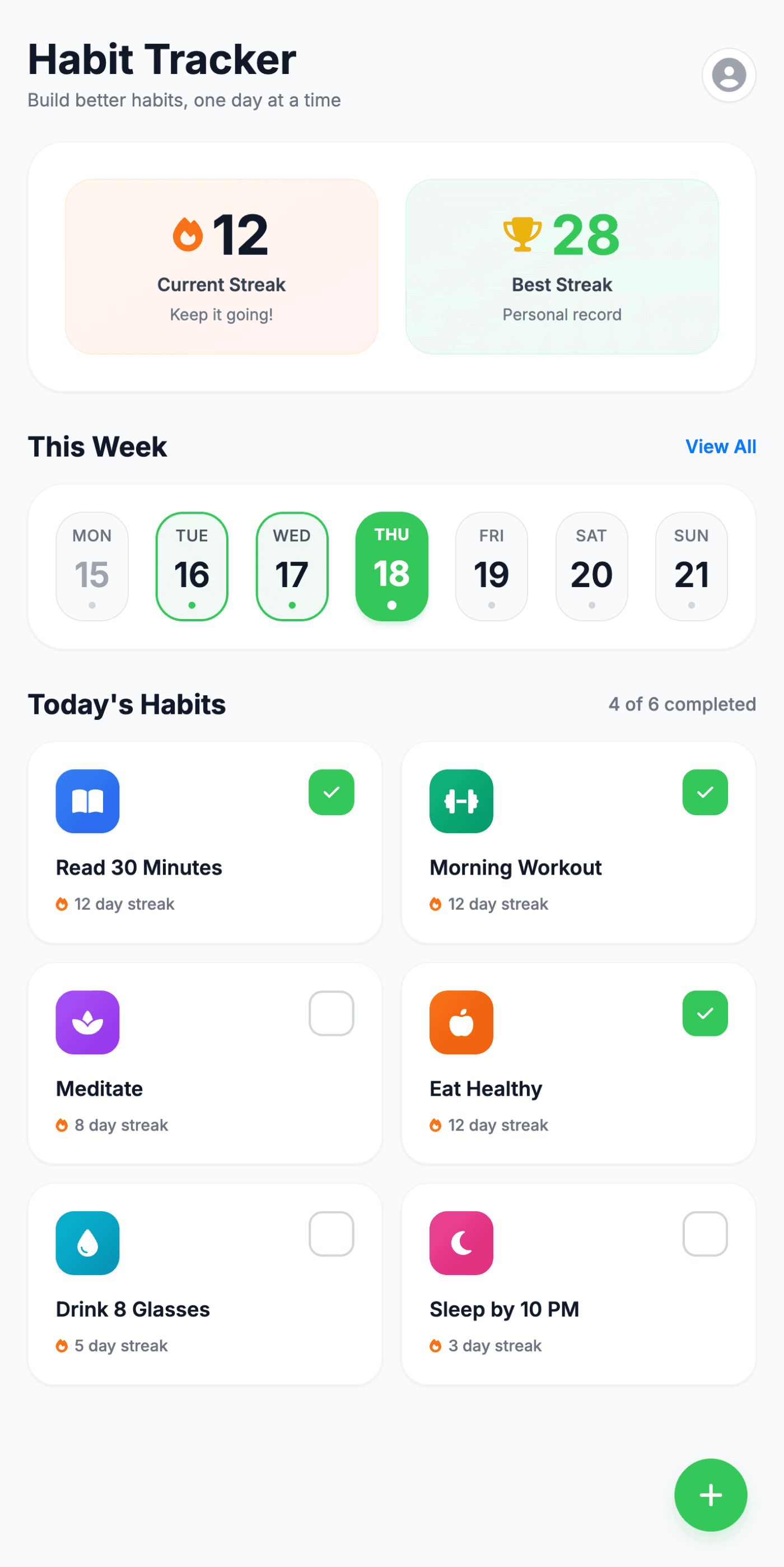
Delightful visual polish — Vibrant icons, soft shadows, and rounded cards give the dashboard a warm, approachable feel.
Strong structure & clarity — Streak counters, weekly calendar, and habit cards are cleanly separated with excellent hierarchy.
Screen feels slightly dense — Reducing card size or spacing could create more breathing room, especially in the habit grid.
Floating action button placement — The FAB sits very bottom-right; raising it slightly could improve thumb reachability.
Lovable AI
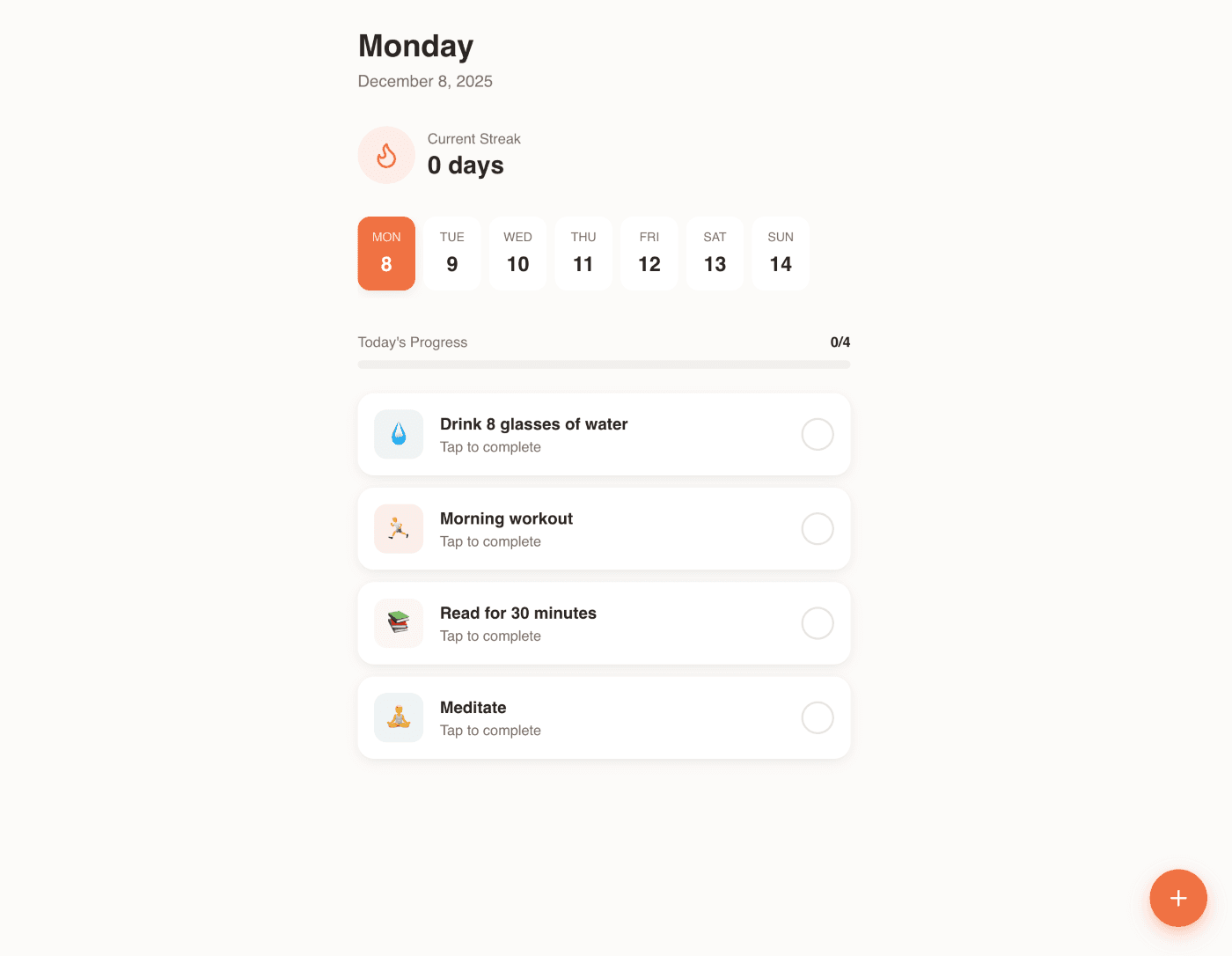
Soft, minimal aesthetic — Light tones and gentle spacing support the “minimal and delightful” direction effectively.
Clear daily focus — The simplified layout emphasizes the current day and today’s progress cleanly.
Feature completeness is lower — No weekly calendar row with selected-day highlight as required by the prompt (only a simpler date row).
Visual delight is subtle — Icons, cards, and streak display feel very minimal; adding small pops of color or micro-illustrations could elevate delightfulness.
Create an e-commerce admin product list screen with product image, name, price, stock, and actions. Include search, filters, and an ‘Add Product’ button.
UXMagic
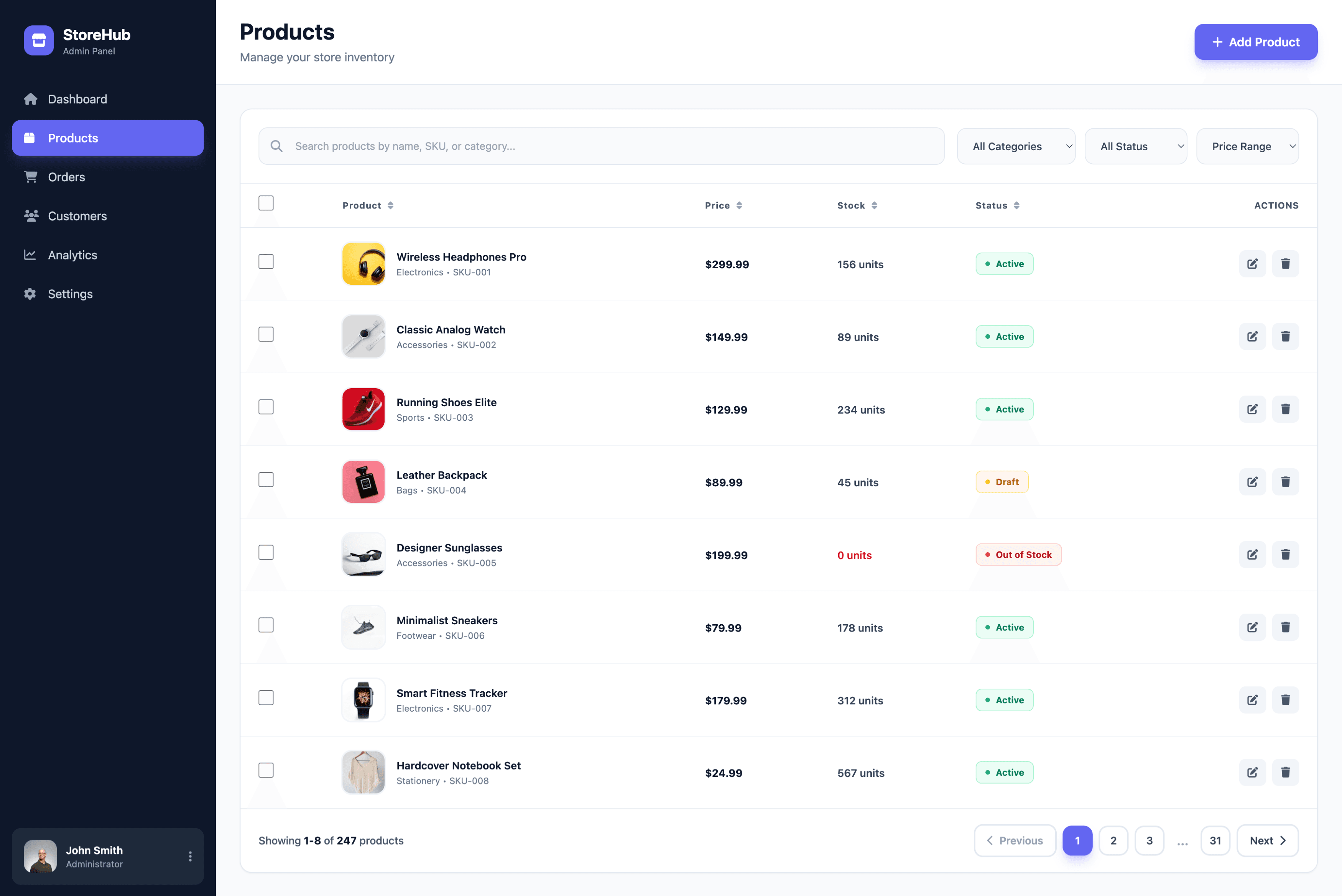
Highly structured, professional layout — Clear hierarchy, consistent spacing, and strong column alignment make it feel production-ready.
Robust filtering controls — Search, category, status, and price-range filters are easy to scan and placed intuitively.
Density is slightly high — Table rows and text feel tightly packed; a bit more vertical breathing room could improve readability.
Sidebar contrast is strong — The dark sidebar dominates visually; softening it slightly could balance attention toward the product table.
Lovable AI
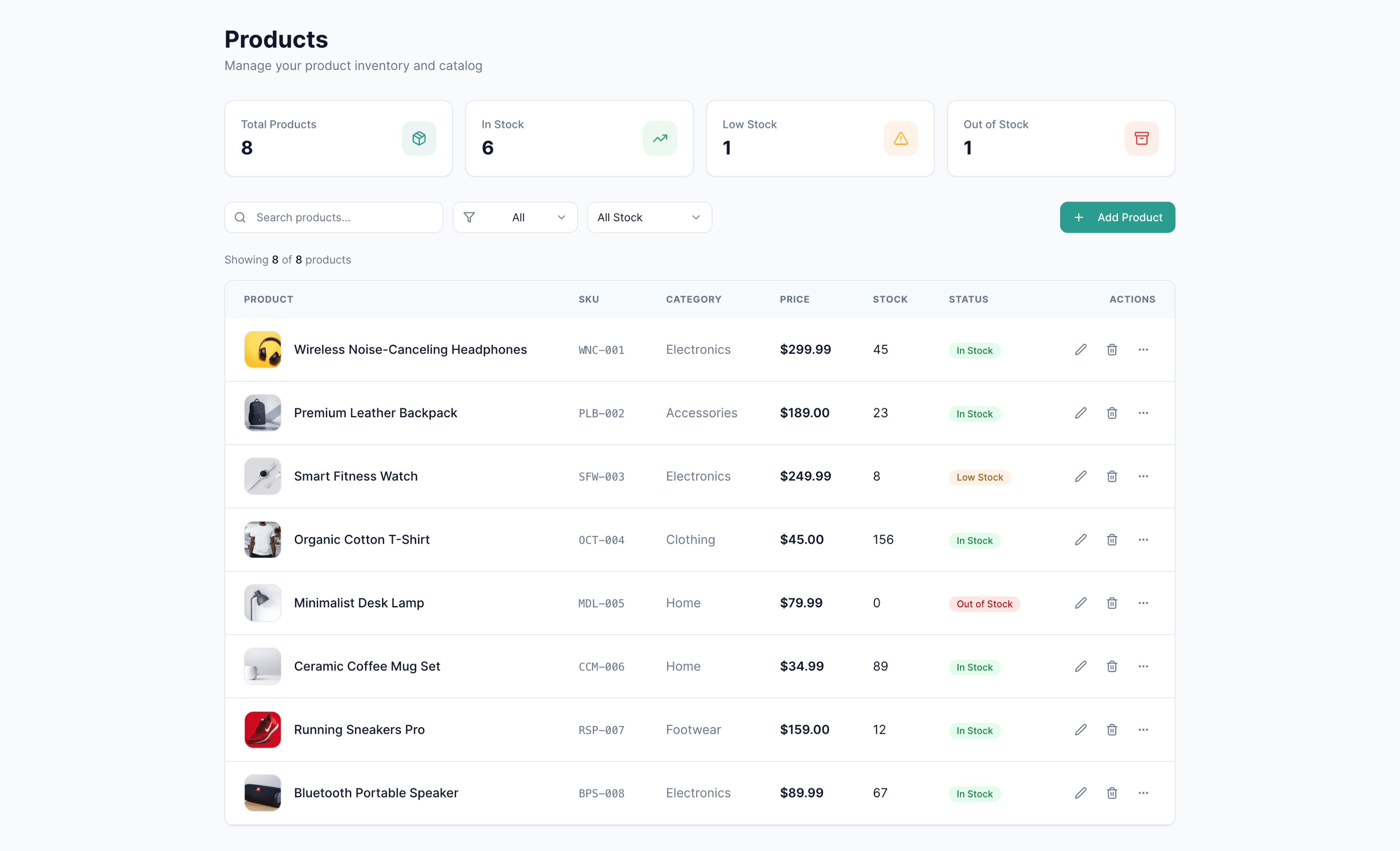
Clean, calm visual style — Light colors and soft shadows give the screen an approachable, modern admin feel.
Useful summary widgets — High-level stats above the table add helpful context and enhance the admin experience.
Filters feel less structured — Search, filter chips, and dropdowns appear loosely arranged; clearer grouping would improve usability.
Table hierarchy could be stronger — Column labels and row dividers are subtle, making scanning slightly harder than ideal.

UXMagic
UXMagic is a visual-first AI design platform that specializes in generating high-fidelity screens, wireframes, responsive UIs, and full design systems. It bridges teams across design and engineering with Figma export, React/HTML output, iterative refinement tools, and style consistency controls. Built for UI/UX designers, product managers, agencies, and founders, UXMagic prioritizes clarity, craft, and predictable design workflows.
Lovable AI
Lovable AI is an AI-native full-stack development platform engineered to turn natural language prompts into working applications. It generates React + TypeScript source code, sets up databases, authentication, routing, and deploys apps automatically. With features like Autonomous Agent Mode and GitHub sync, Lovable AI helps founders and teams ship functional products fast. However, its design flexibility is limited and styling requires post-generation refinement.
Feature Comparison
| Feature | UXMagic | Lovable AI |
|---|---|---|
| Prompt to UI | Generates pixel-perfect UI screens instantly | Generates full apps (UI + backend + logic) |
| Visual Editing | Deep design controls, style guides, layout refinement | Light visual editor for minor UI tweaks |
| Output Types | Figma, React, HTML, asset exports | React/TS codebase, backend, hosting |
| Figma Plugin | Robust import/export workflow | No direct plugin; code-first workflow |
| Real-Time Preview | Instant design previews | Live preview of generated applications |
| Best Strength | Visual fidelity + cross-team workflow | Rapid MVP development + full-stack automation |
UXMagic
Pricing Comparison

Free – $0/month
30 free credits per month Upto 5 screens 5 Projects 1 Figma export UI Design Wireframe Mode Sectional Editing
Premium – $17.5/month
480 credits per month Upto 80 screens 20 Projects 80 Figma exports UI Design Wireframe Mode Sectional Editing Export Code Flows Screenshot to UI Sketch to UI Text Editing and Upload Images
Ultimate – $35/month
1500 credits per month Upto 250 screens Unlimited Projects 250 Figma exports UI Design Wireframe Mode Sectional Editing Export Code Flows Screenshot to UI Sketch to UI Text Editing and Upload Images Import Figma components/design system Clone a site

Free – $0/month
5 daily credits (up to 30/month) Public projects Unlimited collaborators 5 lovable.app domains Cloud
Pro – $25/month
All features in Free, plus: 100 monthly credits 5 daily credits (up to 150/month) Usage-based Cloud + AI Credit rollovers Unlimited lovable.app domains Custom domains Remove the Lovable badge User roles & permissions
Business – $50/month
All features in Pro, plus: 100 monthly credits Internal publish SSO Personal Projects Opt out of data training Design templates
Enterprise – Custom
All features in Business, plus: Dedicated support Onboarding services Custom connections Group-based access control Custom design systems
Final Verdict
Lovable AI and UXMagic solve fundamentally different problems, and the choice depends on whether you need stunning design or deployed functionality. Both platforms excel—but in opposite directions.
Lovable AI is ideal when the priority is speed to functional MVP, automated full-stack scaffolding, and fast deployment cycles—even if design precision is secondary. It excels in founder-led build cycles, internal tool development, and orchestrating multi-step logic through autonomous agents. Teams choose Lovable when reducing engineering lift matters more than achieving pixel-perfect UI.
UXMagic is the stronger choice for teams that need rapid, high-fidelity design exploration, controlled visual direction, and predictable design-phase costs. It fits best when product clarity, stakeholder alignment, and UI polish must be solved before engineering begins. For design-led organizations, UXMagic becomes the upstream engine that shapes the blueprint for everything that follows.
For design-led teams, UXMagic is the clear winner. For founders focused on generating a working Lovable AI app with minimal engineering, Lovable stands out. Many successful teams ultimately use UXMagic → Lovable as a hybrid workflow to achieve both beauty and speed.
got questions?we have answers.
UXMagic specializes in high-fidelity UI design and Figma workflows, while Lovable AI focuses on full-stack app generation and deployment.
Yes. UXMagic offers precise design control, style guides, and layout refinement. Lovable AI’s visual editor is functional but limited.
Lovable AI pricing is credit-based, meaning costs can rise quickly during heavy development—especially when generating or fixing complex features.
Yes. UXMagic exports React/HTML assets and Figma files that can be used to inform or refine your Lovable AI-generated application.
Beginners who care about design should choose UXMagic. Non-technical founders who want a functioning app quickly may prefer Lovable AI.



Related comparisons
Weighing up more than one tool? Here is how UXMagic compares against the closest alternatives.