Design thinking fails when teams spend weeks documenting problems without quickly testing solutions. The framework was conceived to accelerate user-centric innovation, but manual synthesis and slow prototyping routinely stall release velocity instead. Design thinking isn't primarily a framework for visual craft, it's a structured decision-making protocol that only delivers full value when paired with rapid, high-fidelity execution.
You already understand user story mapping, qualitative testing methods, and baseline UX terminology. This isn't a primer on what empathy means or why feedback matters. It's where the classical Double Diamond model breaks down under real sprint pressure, and the operational model that closes the gap between problem framing and a testable UI.
The short version: without tooling that bridges problem framing and interactive layout, human-centered design risks staying theoretical - activity that feels productive without producing something engineering can build from.
Quick Comparison
| Traditional Design Thinking | AI-Assisted Design Thinking |
|---|---|
| Research → Wireframes → Prototype | Research → Prompt → Multi-screen flow |
| Manual affinity mapping and synthesis | AI-assisted transcript analysis |
| Slow validation cycles (weeks) | Faster testing loops (hours to days) |
| Low-fidelity sketches before commitment | High-fidelity concepts generated directly |
The Five Stages of Design Thinking
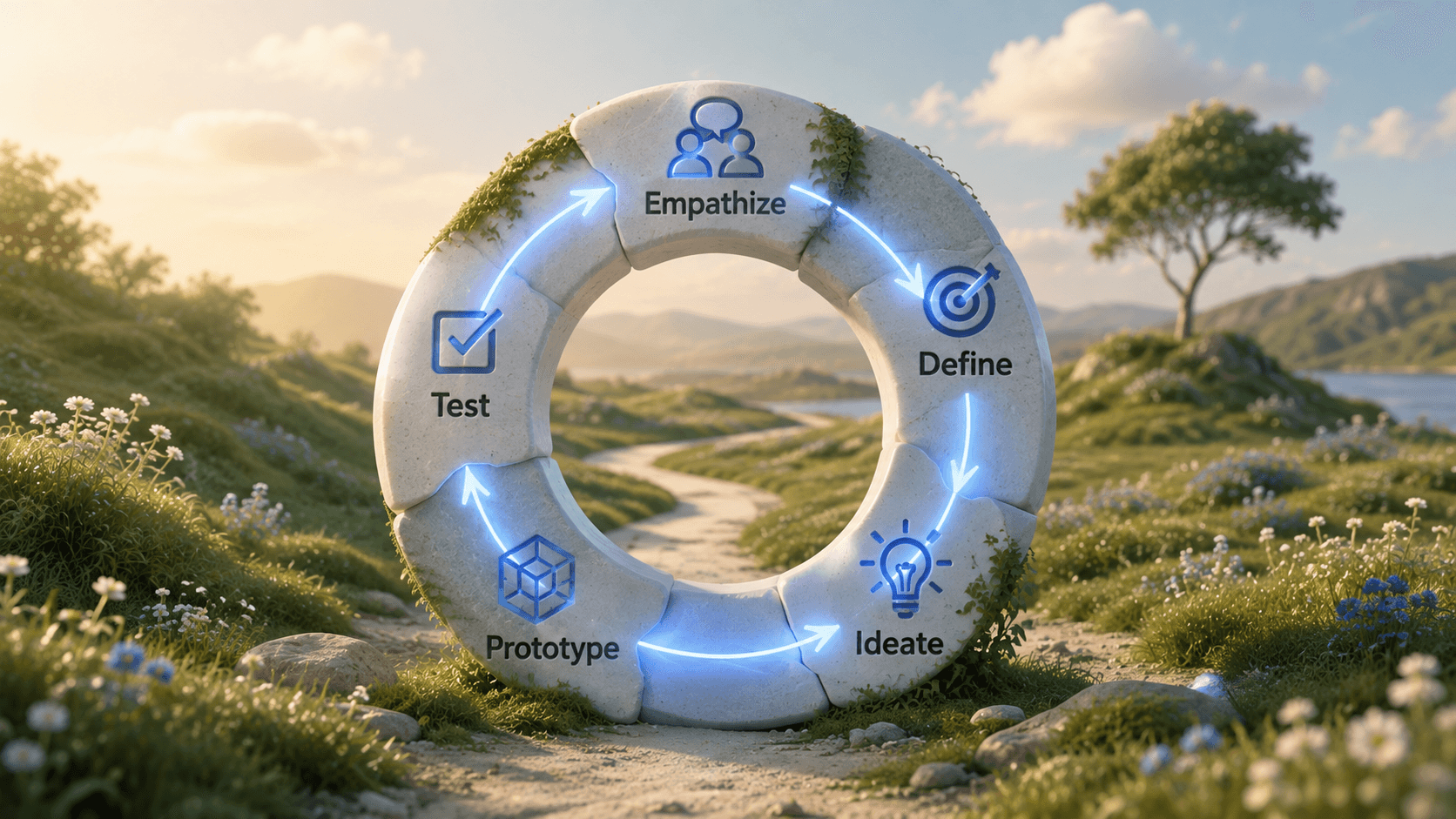
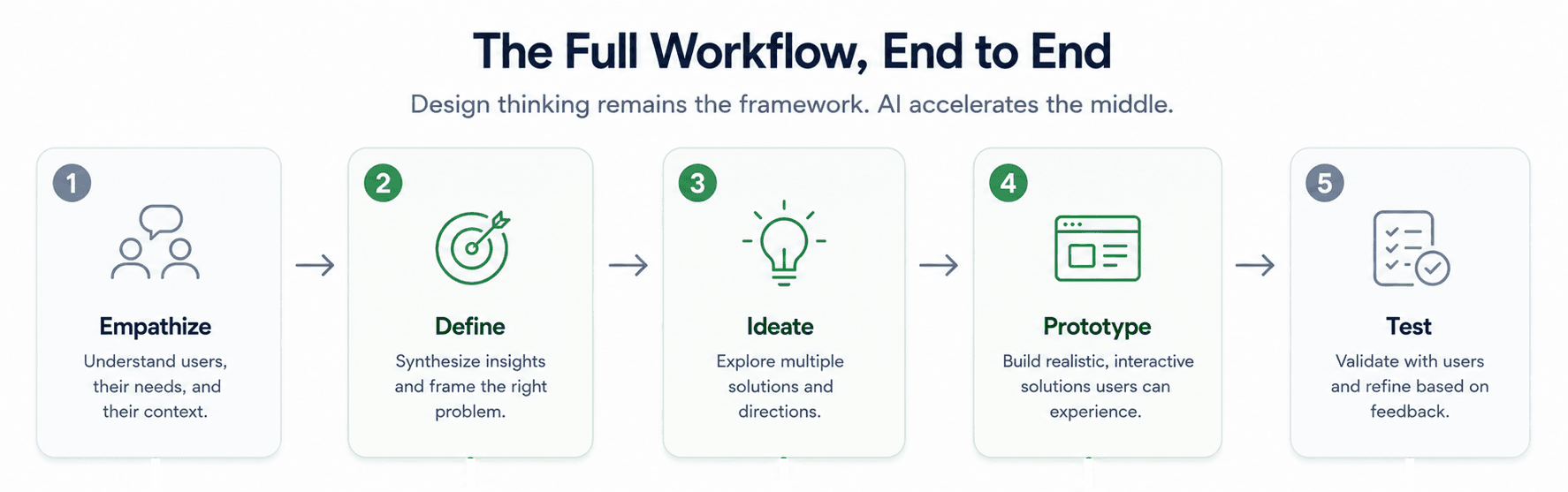
Originated by the Stanford d.school, the classical model moves through five stages:
- Empathize - understand user needs through research and observation
- Define - synthesize research into a specific, actionable problem statement
- Ideate - generate a range of potential solutions
- Prototype - build testable representations of the strongest concepts
- Test - validate with real users and feed findings back into earlier stages
That's the framework as taught. What follows is how AI-native teams actually execute it under real sprint pressure not replacing the five stages, but changing how fast and how non-linearly a team moves through them.
The Operational Reality of Modern Design Thinking
Why the Classical d.school Model Stalls SaaS Sprints
The classical five-stage linear model can stall high-velocity teams when followed too rigidly. Empathize, Define, Ideate, Prototype, Test presented sequentially, that order sounds tidy. Actual product design often benefits from parallel execution instead. Prototyping alongside problem definition tends to expose unstated user edge cases before technical resources get committed to the wrong ones.
Empathy research without reasonably prompt visual prototyping risks becoming procrastination dressed up as rigor. Traditional methodology advocates extended observation and synthesis before attempting solution design. In SaaS environments, user feedback on low-fidelity static concepts can yield ambiguous data. Testable, higher-fidelity UI flows tend to generate sharper insight, which is why early visual execution works better as part of the research phase rather than strictly downstream of it.
Moving from Sticky-Note Workshops to Production Execution
Low-fidelity wireframes are less critical for teams that can rapidly generate and test higher-fidelity concepts. Teams historically relied on crude paper sketches or gray boxes specifically to avoid prematurely committing to layout detail before execution speed caught up. Modern AI design workflows generate component-driven, production-ready screens quickly narrowing the gap that gray-box wireframing was originally built to manage.
Stage 1 & 2: Insight Synthesis and Problem Definition
Turning Qualitative Research into Actionable Constraints
Product teams distill qualitative research transcripts, behavioral analytics, and support tickets into structured constraints. Instead of multi-day manual affinity mapping, research text gets synthesized with automated text processing to extract core friction points fast. The output is a refined "How Might We" statement paired with explicit user context, business logic, and functional data requirements.
Framing Problem Statements Using the 5 Ws Model
Write "How Might We" statements that incorporate specific user contexts, business parameters, and clear success metrics using the 5 Ws framework - who, what, when, where, why. A vague HMW produces vague prototypes downstream; specificity here is what makes the next stage actually generate something usable. This is where UX flow mapping from user story to production wireframe becomes relevant - the HMW statement is only as useful as what it translates into.
Stage 3 & 4: Generative Ideation and Rapid Prototyping
Eliminating Layout Lag with Text-to-UI Flow Automation
The transition between defining a problem statement and constructing a testable prototype is a frequent point of process failure. Designers routinely hit manual layout lag translating textual constraints into visual wireframes by hand. Pasting a structured user story or HMW statement directly into a text-to-UI tool instantly translates that textual logic into multi-screen visual user flows, cutting initial layout setup from days to seconds.
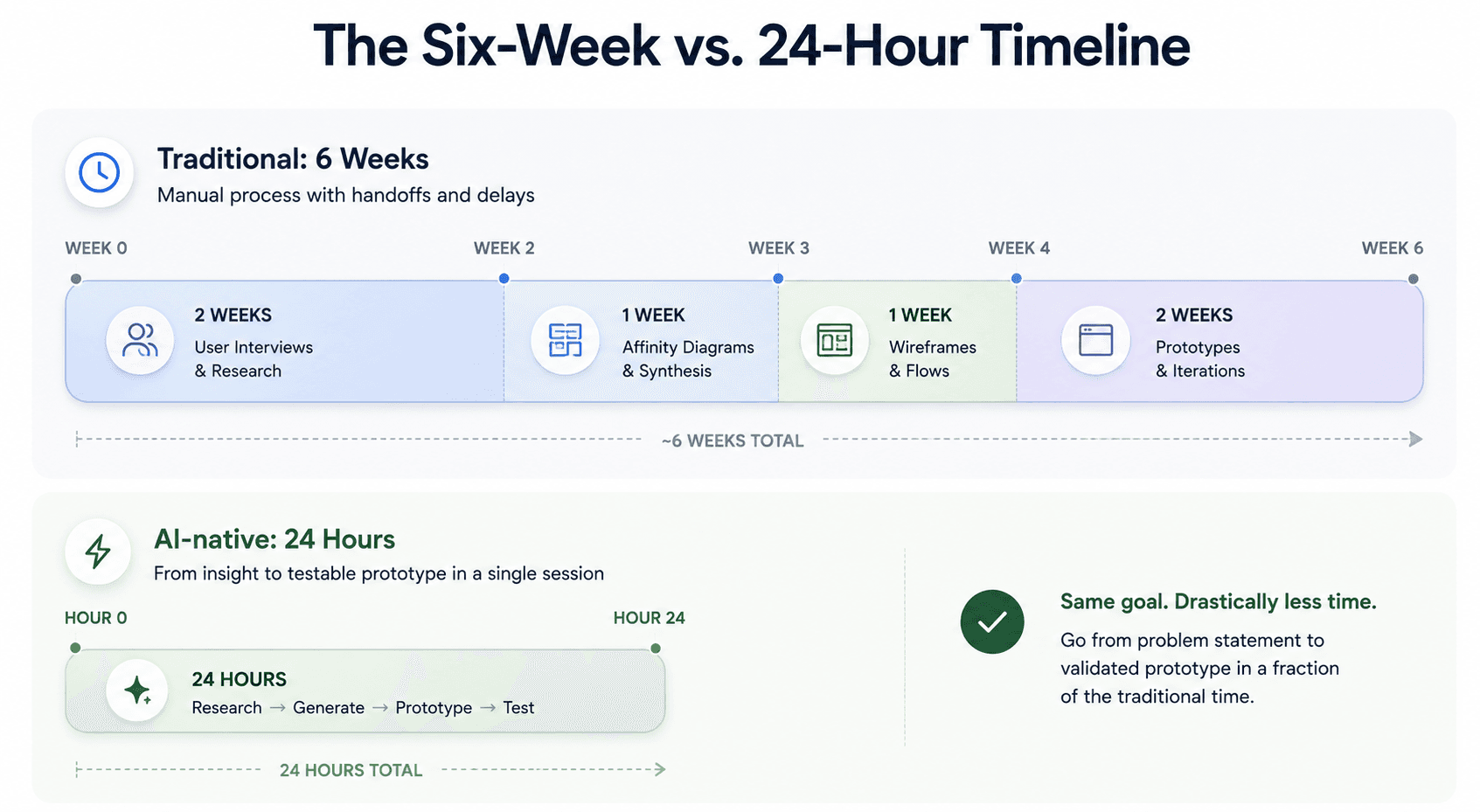
Here's what that looks like on a real project. An enterprise analytics platform sees a 42% drop-off during workspace configuration. The traditional path: two weeks interviewing users, one week building affinity diagrams, one week sketching wireframes, two weeks assembling interactive prototypes - six weeks before anyone tests anything. The AI-native version synthesizes the drop-off transcripts directly into a prompt: "Generate a 4-step B2B SaaS onboarding flow featuring team role selection, workspace naming, integration setup, and a completed state dashboard." Production-ready screens come back in minutes, and usability testing starts within 24 hours.
Maintaining Visual System Consistency Across Screen Variations
AI works best here as an engine for structured iteration, not as a generator of disconnected visual variety. Generic generative tools routinely produce isolated screens with no system consistency or contextual flow between them. During ideation specifically, exploring multiple architectural variations matters, the risk is committing to the first plausible visual solution instead of actually comparing options.
Generic AI image generators tend to fail specifically on multi-tenant permission flows - floating dashboard widgets with inconsistent typography, mismatched form controls, broken navigation hierarchies. Feeding the same security and role logic into a structured design engine instead outputs complete permission tables, modal dialogs, and toggle states that preserve spacing tokens and structural rules across every screen state. For teams governing this at scale, design system governance in fast-moving SaaS teams covers the token discipline that makes this consistency possible in the first place.
Stage 5: Usability Validation and Engineering Handoff
Closed-Loop Testing with High-Fidelity Artifacts
Generated visual flows link into interactive prototypes for immediate usability testing. Feedback from that testing feeds directly back into prompt adjustments or manual component fine-tuning - a tight loop instead of a multi-week revision cycle.
Bridging Design Tokens to Production Frontend Code
The handoff between conceptual user flows and functional frontend code often breaks specifically because wireframes lack underlying structural component logic. Because components get generated using standardized system logic from the start, the visual artifacts map more cleanly into developer-facing design tokens and production code structures, reducing handoff friction many teams treat as inevitable, though rarely eliminating the need for developer review entirely.
Industry Examples Beyond SaaS
Fintech onboarding. A KYC verification flow - document upload, identity checks, risk disclosures needs every screen to feel equally trustworthy and compliant. Generating the full sequence from one structured brief keeps form field styling and disclosure language consistent across every step, rather than drifting screen to screen as each gets designed in isolation.
Healthcare workflows. A patient intake flow handling sensitive medical history and insurance verification has real accessibility and clarity requirements. Prototyping the full flow together, rather than one screen at a time, surfaces where a required field or an unclear medical term might block a patient mid-flow before that gap reaches a real user.
E-commerce checkout. Cart review, shipping, payment, and confirmation need identical button hierarchy and field styling to avoid the drop-off that comes from a checkout that feels like four different products stitched together. Generating the sequence as one flow keeps that consistency intact from the first prototype.
Enterprise dashboards. Role-based views - admin, manager, viewer sharing the same underlying data need consistent navigation and component behavior across every role, or users switching between permission levels experience the product as unpredictable. A single generation pass covering all three roles avoids the drift that comes from designing each one separately.
What AI Cannot Replace in Design Thinking
Faster execution doesn't replace the judgment calls that actually make a product good. A few things worth naming directly:
- User empathy. AI can synthesize interview transcripts fast, but understanding why a user hesitated, what they didn't say, or how a workflow fits their actual daily context still requires a human doing the listening.
- Business judgment. Deciding which problem is worth solving, and which tradeoffs a business can actually absorb, is a strategic call - not something a prompt can weigh for you.
- Prioritization. Generating five prototype directions fast doesn't tell you which one to actually build first; that still requires someone weighing user impact against engineering cost and business timing.
- Product strategy. Where a feature fits into a broader roadmap, and whether it moves the product toward or away from its actual positioning, is a judgment call speed doesn't substitute for.
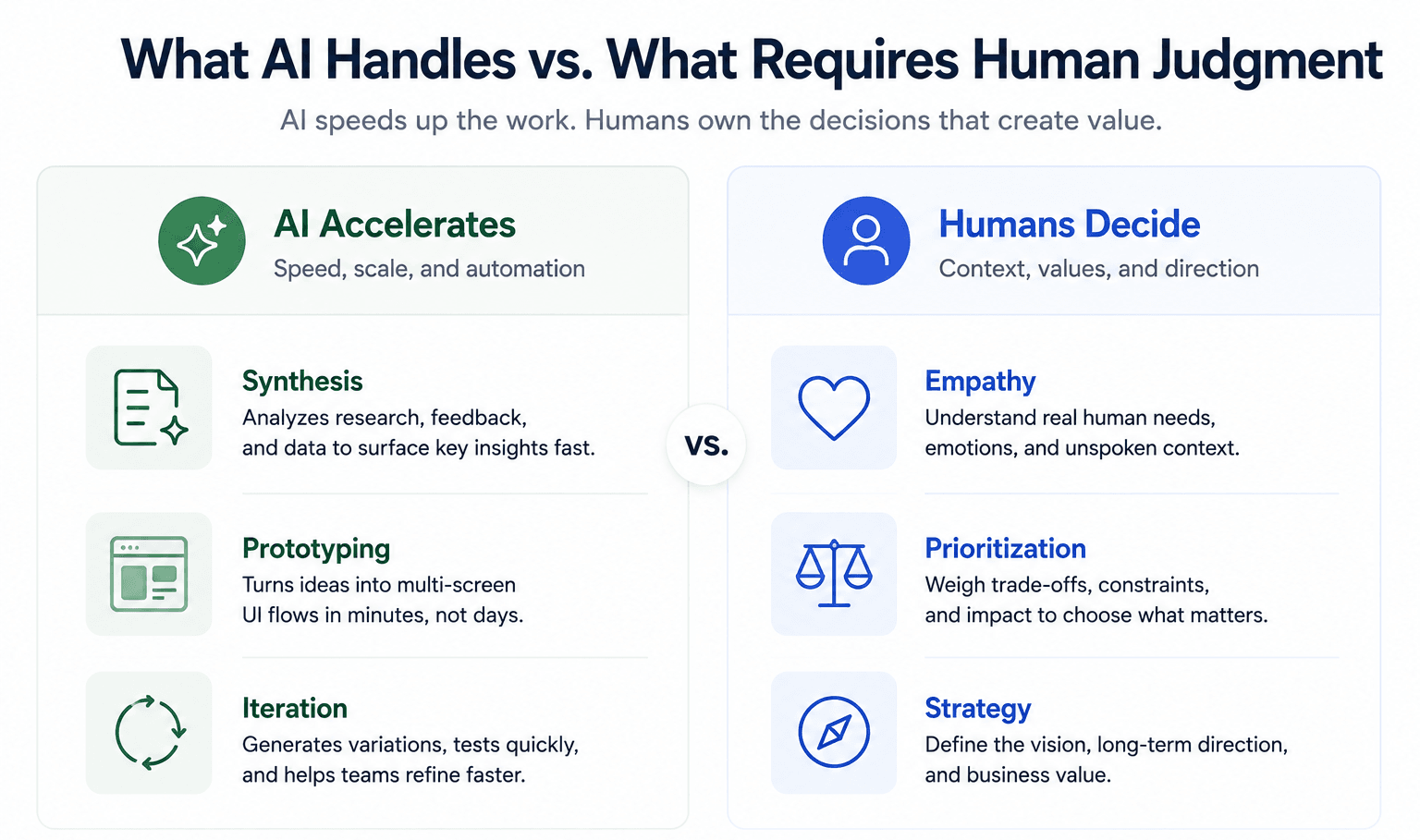
AI compresses the distance between "we understand the problem" and "we have something to test." It doesn't replace deciding whether the problem was the right one to solve in the first place.
UXMagic Across the Design Thinking Process
Most of what's described above as "AI-native execution" is a specific, repeatable workflow worth naming directly rather than leaving implied across separate sections.
The transition between Define and Prototype is where UXMagic's Prompt to UI fits first: paste a structured HMW statement or user story directly in, and it translates that text into a multi-screen visual flow instead of leaving a designer to manually lay out wireframes from scratch. During Ideate, where exploring multiple directions matters most, Flow Mode keeps every screen in a generated journey not just the first one - consistent in typography, spacing, and design tokens, which is the specific failure mode that makes generic single-screen AI tools unreliable for anything beyond a single mockup.
That consistency is also what closes the gap at Stage 5. Because screens are generated against standardized system logic from the start, the visual artifacts that come out of ideation map more directly into the tokens and component structure engineering actually needs - rather than a set of disconnected mockups someone has to reconcile before handoff. None of this replaces the judgment covered in the section above; it just means the mechanical distance between "we know the problem" and "we have something real to test" stops being the bottleneck.
Comparative Framework: Design Thinking vs. Agile vs. Lean Startup
These three get conflated constantly, and the confusion causes real process friction. Design Thinking focuses on identifying the right user problem through empathy and human-centered exploration. Lean Startup emphasizes business viability by testing hypotheses via Minimum Viable Products. Agile provides the software development framework to build and ship in short, incremental sprints.
None of the three replaces the others - Design Thinking answers "are we solving the right problem," Lean Startup answers "will this work as a business," and Agile answers "how do we actually ship it." Treating any one of them as a complete methodology on its own is how a team ends up validated on the wrong axis.
Turn Ideas Into Testable Flows
Stop waiting weeks to validate concepts. Try UXMagic free and transform your HMW statements into connected, multi-screen UI flows the same day.