Output Comparison
Design a mobile task management app with a calendar, to-do list, and team collaboration features.
UXMagic.ai
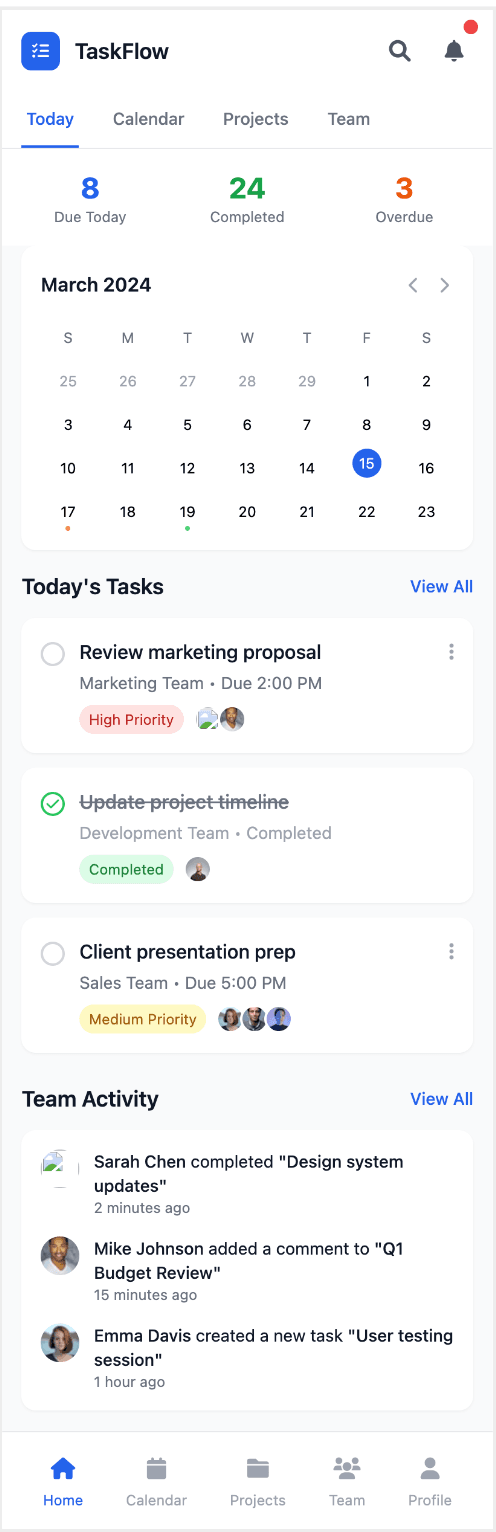
The dashboard provides a quick, comprehensive overview with multiple data points like a calendar, task statuses (due, completed, overdue), and a to-do list.
It features a 'Team Activity' section that offers real-time updates on what other team members are doing, adding a dynamic and collaborative element.
The number of metrics and sections on a single screen might overwhelm users and make it hard to focus on a single key task or metric.
The layout is dense and packed with information, which could lead to visual clutter and a steep learning curve for new users.
BuildWith Mocha

The design is minimalistic and clean, with a clear focus on a key value proposition, making it easy to understand the product's purpose quickly.
The use of bold typography and ample white space creates a clear, marketing-focused layout that guides the user toward a single call to action.
It is a landing page and lacks the immediate, detailed overview of tasks, calendars, or team activity that a functional dashboard offers.
The information presented is highly aggregated and lacks a 'recent activity' section, so it doesn't provide real-time updates or granular details on tasks.
Build a responsive e-commerce landing page with product grid, cart, and checkout flow.
UXMagic.ai

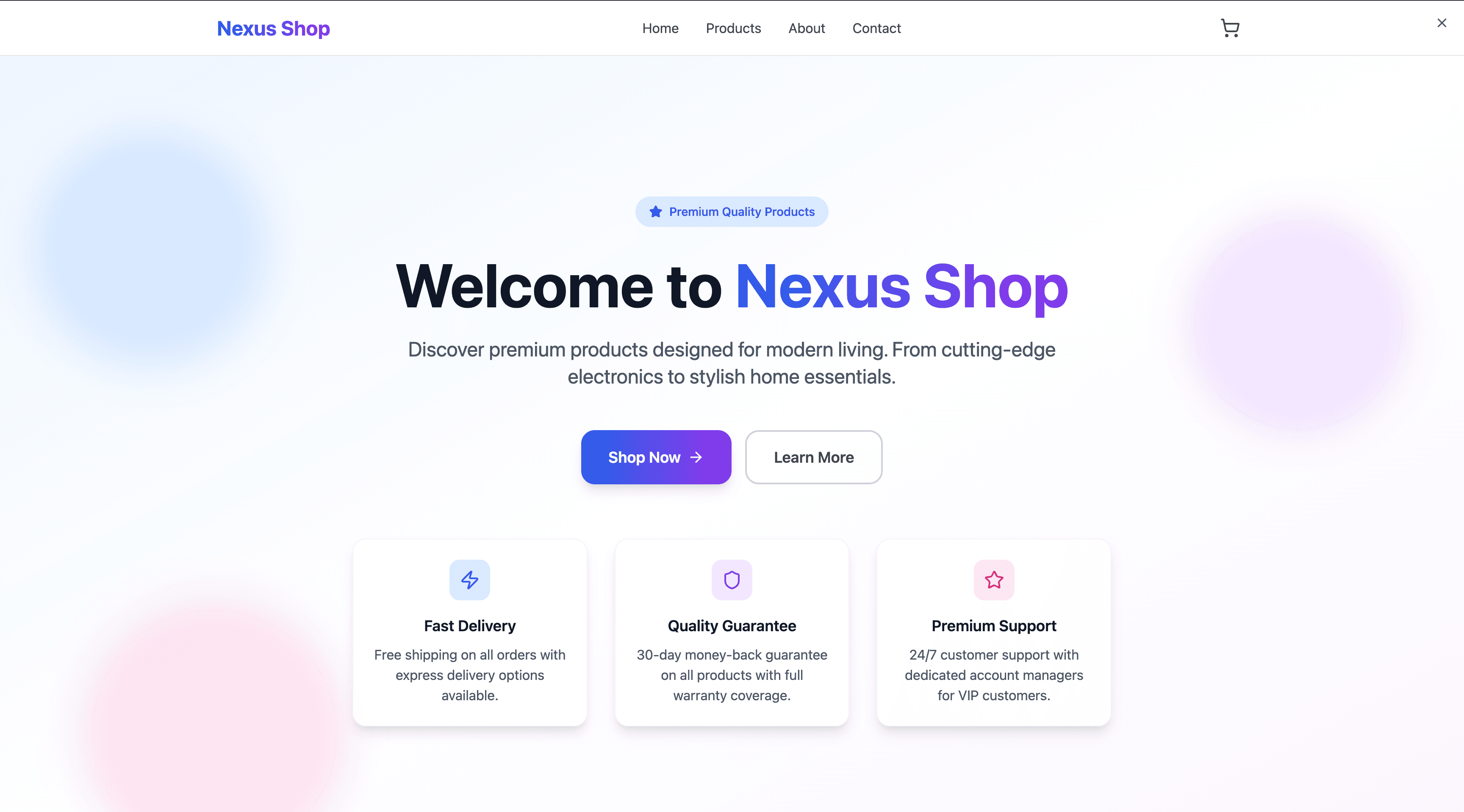
The design is very clean and minimalistic, with a strong focus on the core value proposition and key customer benefits clearly laid out below.
It has a balanced layout with a central hero section and clear calls to action ('Shop Now' and 'Learn More') that are easy to find and understand.
It lacks visual engagement, such as an image of the products, which might not be compelling enough for new customers to browse further.
The design is quite generic and could be used for any product, not specifically tailored to a particular type of e-commerce store.
BuildWith Mocha
The design is visually engaging and dynamic, using a hero image to immediately showcase the product type (fashion) and create a strong brand identity.
It provides social proof through key statistics (Customers, Products, Rating), which helps build trust and credibility with potential buyers.
The layout is asymmetrical and a bit fragmented, which could make it less intuitive to navigate compared to a more structured, balanced design.
The use of an abstract background and bright colors may not appeal to all users and could distract from the main content.

UXMagic.ai
UXMagic is the AI design copilot for professionals. It instantly generates wireframes, high-fidelity UI mockups, and exportable code. With seamless Figma, React, and Webflow integration, it accelerates workflows by up to 70% while maintaining design system consistency

BuildWith Mocha
BuildWith Mocha is an AI-powered no-code app builder that translates natural language into full-stack applications. With built-in backend services like authentication, databases, and storage, it acts like a “technical co-founder” for non-technical entrepreneurs.
Feature Comparison
| Feature | UXMagic.ai | BuildWith Mocha |
|---|---|---|
| Prompt to UI | Yes – Supports text, sketches, screenshots, URLs | Yes – Conversational “vibe coding” |
| Style Guide | Auto-generates style guides + design systems | Minimal—focus is on functionality |
| Component Editing | Rich editing in Figma + AI refinement tools | Limited editing; offers “Dev Mode” for code tweaks |
| Team Features | Ideal for design teams; supports imports of custom components | Built for solo entrepreneurs/startups |
| Figma Plugin | Yes – Dedicated Figma plugin | No |
Who Should Use UXMagic
Pricing Comparison

Free – $0
5 project, 60 free credits (one-time), upto 10 screens, 1 Figma export
Premium – $14/month
20 projects, 300 credits (monthly), upto 50 screens, 50 Figma exports, React/HTML exports
Ultimate – $28/month
Unlimited projects, 1440 credits (monthly), upto 240 screens, 240 Figma exports, unlimited React/HTML exports

Free – $0
60 credits, deploy 1 app
Bronze – $19/month
1, 500 credits, up to 5 apps
Silver – $46/month
4, 500 credits, up to 15 apps
Final Verdict
When it comes to UXMagic vs BuildWith Mocha, the choice depends on your goals:
If you want to launch full-stack apps without coding, BuildWith Mocha is the best option for entrepreneurs and non-technical founders.
If you need polished designs, production-ready exports, and seamless Figma-to-code workflows, UXMagic is the clear winner for professionals.
In short: BuildWith Mocha builds the business. UXMagic builds the craft.
got questions?we have answers.
UXMagic accelerates design workflows with Figma-ready exports, while BuildWith Mocha builds full-stack applications through conversational AI.
Yes. UXMagic is built for designers, with features like Figma plugins and style guide generation. BuildWith Mocha is focused on app-building, not design fidelity.
No. BuildWith Mocha AI generates live apps, not polished design exports. UXMagic is the tool for pixel-perfect design assets.
UXMagic supports exports to React, HTML, and Webflow, making it easy to integrate into dev workflows. BuildWith Mocha focuses on deployment, not external repos like Mocha Github.
Designers and product teams should choose UXMagic, while non-technical entrepreneurs launching full apps should go with BuildWith Mocha.






Related comparisons
Weighing up more than one tool? Here is how UXMagic compares against the closest alternatives.