Output Comparison
“Design a luxury fintech landing page with a hero section, feature grid, testimonial carousel, pricing table, and email signup. Dark theme, premium typography, subtle animations.”
UXMagic
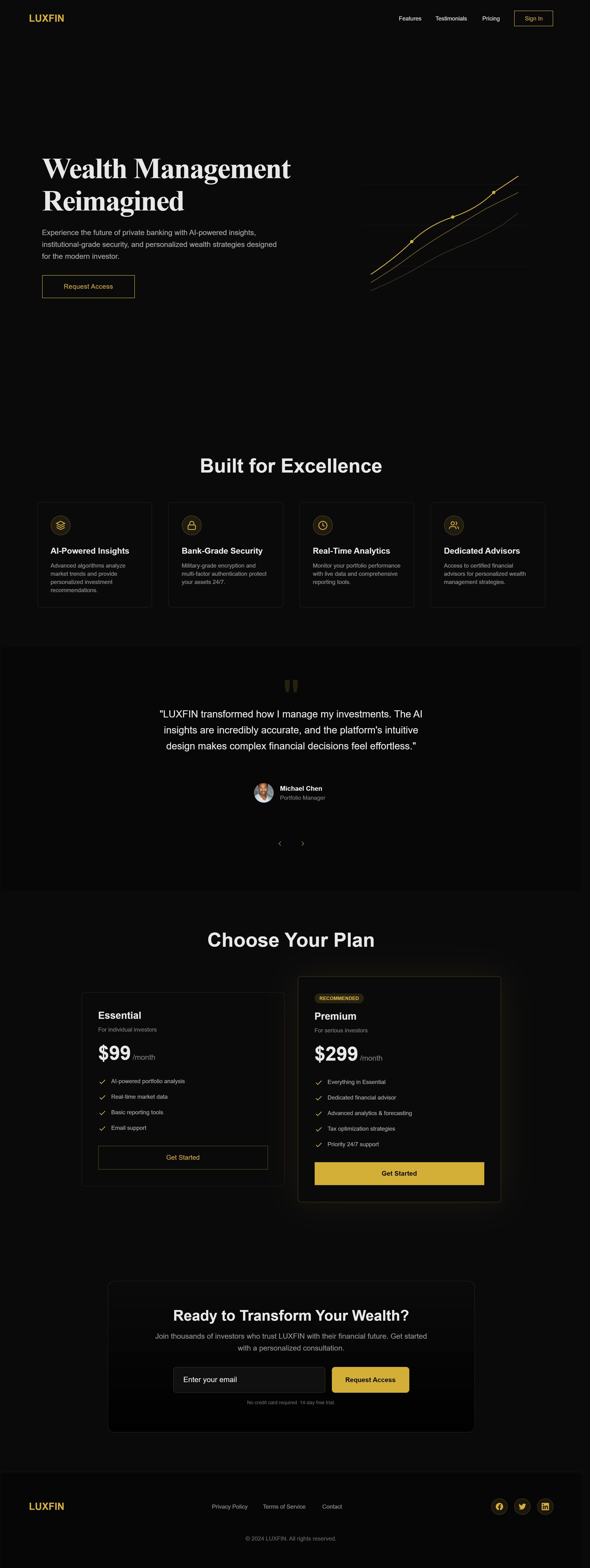
Premium black–gold color palette builds trust and financial credibility. Clear visual hierarchy with strong headline and CTA focus.
Well-structured flow: hero → features → social proof → pricing → conversion.
Visuals are minimal and slightly static (less immersive).
Brand personality feels safe but not memorable.
Replit AI
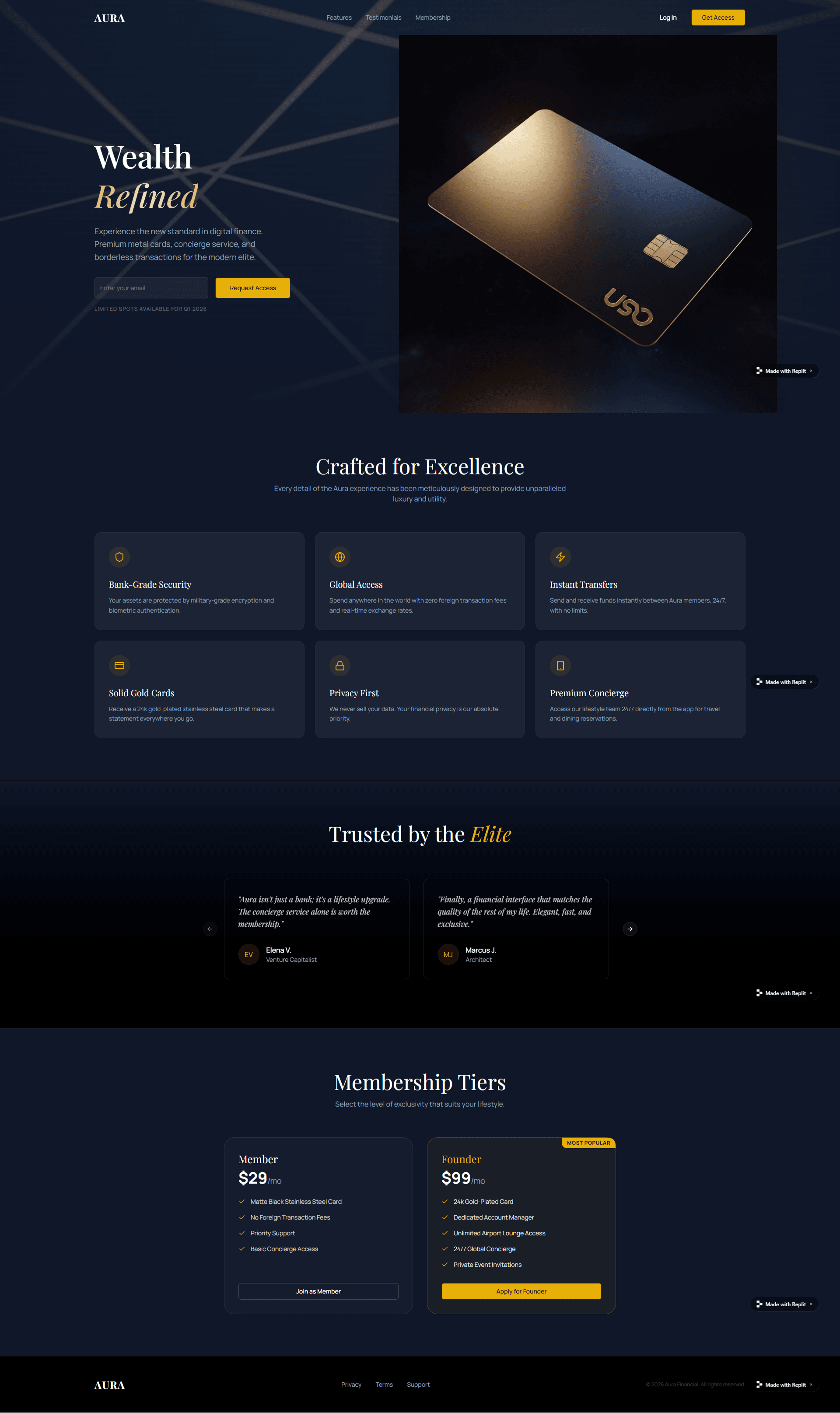
Visual storytelling is stronger and more immersive.
Aspirational positioning (“Elite”, “Founder”, “Concierge”) creates desire.
Some text contrast issues reduce readability, and CTA visibility is weaker.
Feature explanations are less clear and more marketing-heavy, it feels more like a brand showcase than a product-led landing page.
“Create a B2B analytics dashboard with sidebar navigation, KPI cards, line charts, data tables, filters, and user profile menu. Modern, minimalist, enterprise-grade design.”
UXMagic
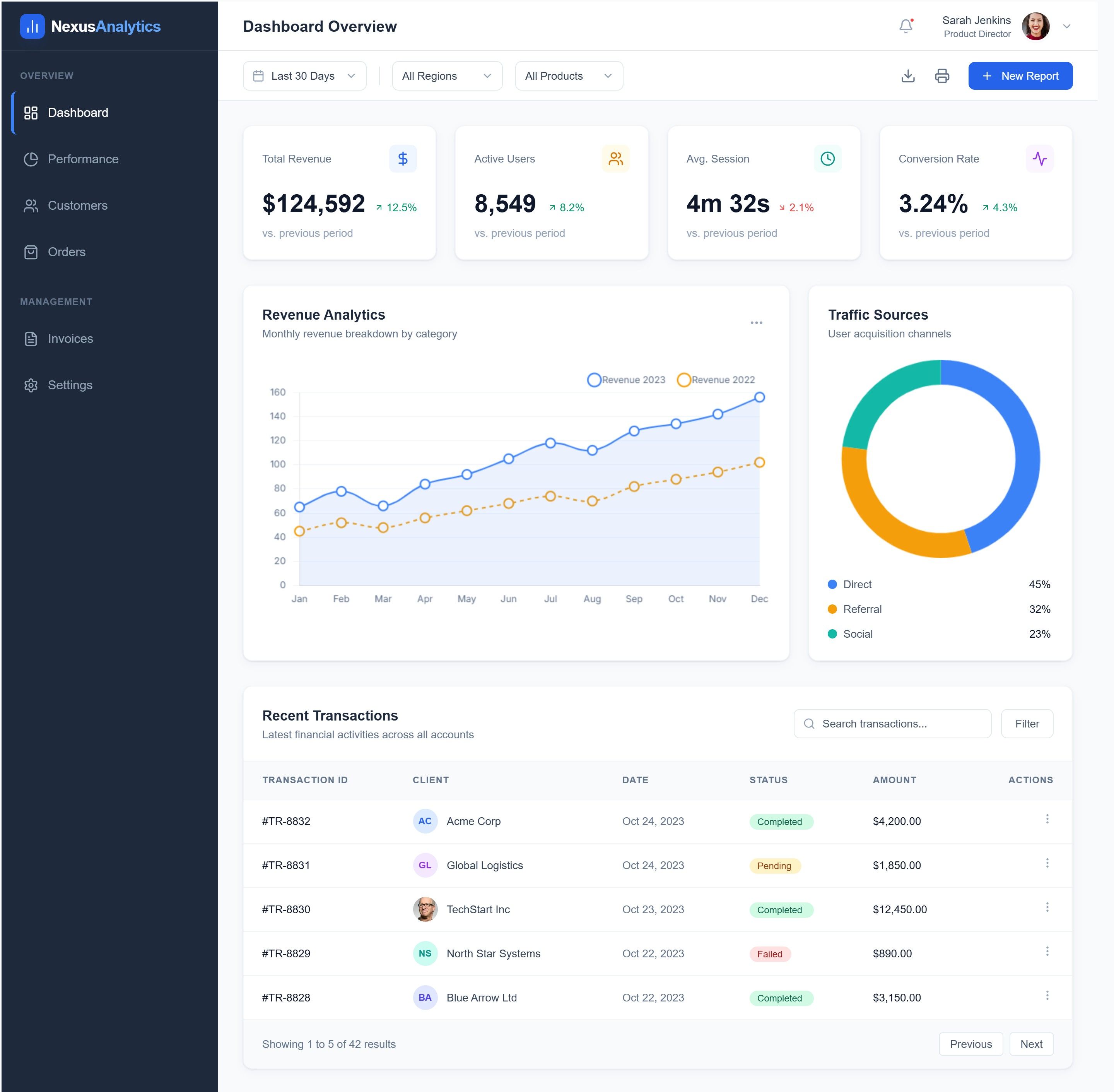
Very clean visual hierarchy with clear KPI cards and spacing.
Data is easy to scan (revenue, users, conversion, charts, tables are well organized).
Feels generic SaaS-dashboard; low brand personality.
Sidebar is text-heavy and could be more visually compact or icon-led.
Replit-AI
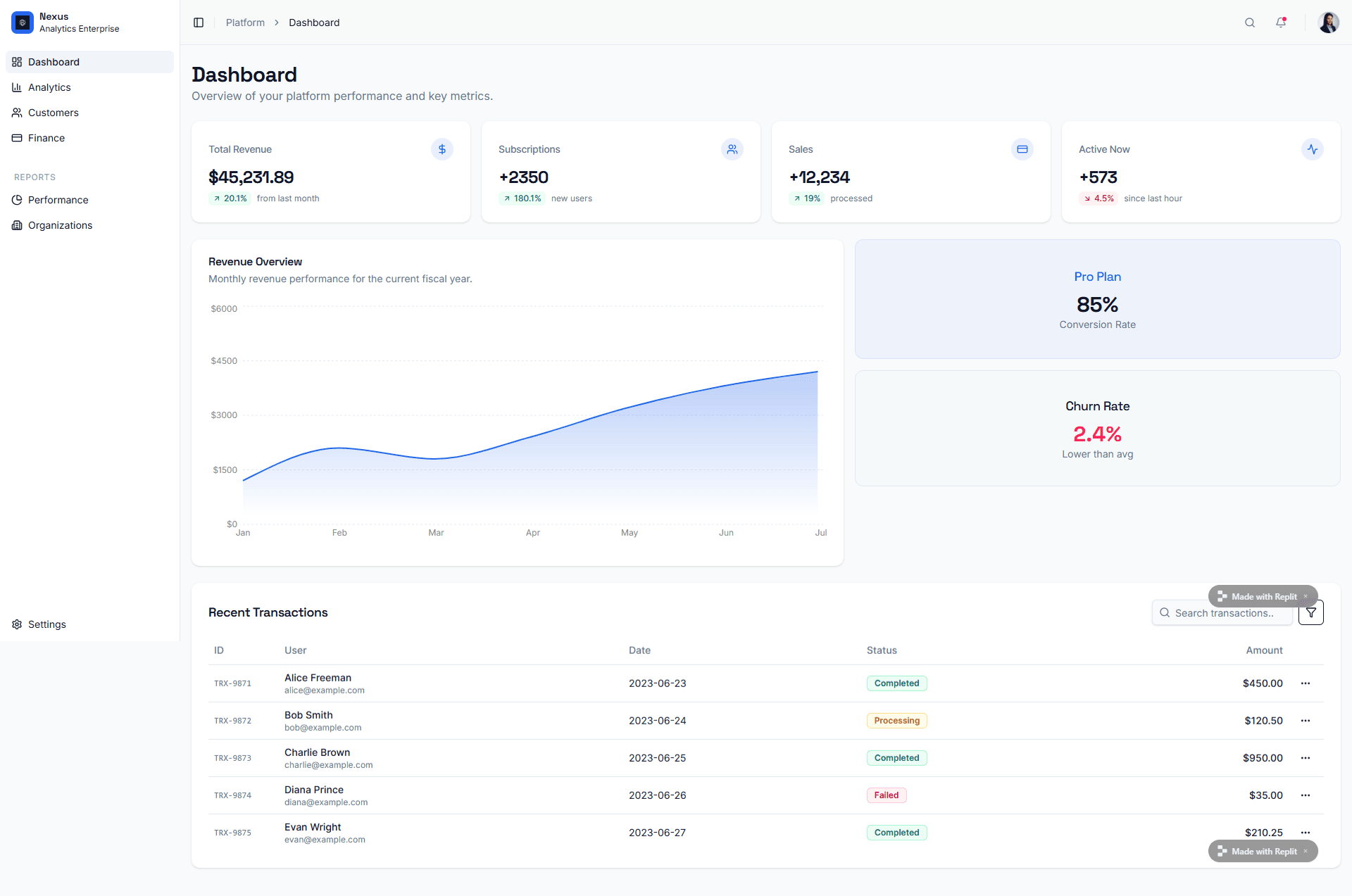
Modern, minimal look with good use of white space and soft shadows.
Metrics like conversion rate and churn are highlighted clearly for quick decision-making.
Visual contrast is low in some cards, making sections blend together.
Too many similar-looking cards reduces visual prioritization of what’s most important.

UXMagic
UXMagic is the world’s first vibe-driven UI/UX design system generator. It transforms prompts, sketches, screenshots, and PRDs into fully structured Figma files and production-ready React/Tailwind code. With deep Figma integration, component governance, style guide generation, and design-to-code export, UXMagic acts as an intelligent exoskeleton for professional design and frontend teams.

Replit-AI
Replit AI is an autonomous full-stack development platform powered by Agent 3 and Design Mode. It converts natural language into complete applications — frontend, backend, database, and deployment — all inside a cloud IDE. With native mobile app generation, self-debugging loops, and zero-setup infrastructure, Replit is optimized for rapid product creation and solo-founder velocity.
Feature Comparison
| Feature | UXMagic | Replit-AI |
|---|---|---|
| Prompt to UI | Converts intent into governed UI systems in Figma & React | Generates live UI as part of full-stack app |
| Export Options | Figma, React, HTML, Tailwind, Design Tokens | Live hosted app, source code in IDE |
| Style Guide | Auto-generated design system with tokens & components | No formal design system governance |
| Component Editing | Fully editable Figma components & React blocks | Edit via code or natural language |
| Figma Plugin | Native, deeply integrated | No Figma-native workflow |
| Real-Time Preview | Live UI preview in Figma & browser | Live running application |
| Mobile Apps | Responsive web output | Native iOS & Android via Expo |
UXMagic
Pricing Comparison

Free – $0
30 free credits(One Time) upto 5 screens 5 projects 1 figma export UI Design Wireframe Mode Sectional Editing
Premium – $25/month
480 credits (Monthly) upto 80 screens 20 Projects 80 Figma Exports Export Code UI Design Wireframe Mode Sectional Editing
Ultimate – $50/month
1500 credits(Monthly) upto 250 screens Unlimited Projects 250 Figma Exports Export Code UI Design Wireframe Screenshot to UI Sketch to Ui Import your Figma components/Design System Clone a site(from URL) Sectional Editing Text Editing & Upload Images

Free – $0
Free daily Agent credits Free credits for AI integrations Publish 1 app Limited Agent intelligence
Replit Core – $20/month
$25 of monthly credits Access to latest models Publish and host live apps Autonomous long builds Remove "Made with Replit" badge Pay-as-you-go for additional usage
Teams – $35/user/month
Everything included with Replit Core $40/month in usage credits included Upfront credits on annual plan 50 Viewer seats Centralized billing Role-based access control Private deployments
Final Verdict
In the UXMagic vs Replit AI comparison, the choice is strategic, not technical.
Replit AI is the fastest path from idea to deployed software.
UXMagic is the fastest path from idea to production-grade UI systems.
Use Replit when speed and autonomy matter most. Choose UXMagic when brand fidelity, scalable components, and professional frontend handoff define success.
got questions?we have answers.
Yes. UXMagic is purpose-built for UI/UX workflows, Figma integration, and design system governance.
No. UXMagic focuses on frontend and design-to-code, while Replit AI handles backend, infra, and deployment.
Replit uses a flat team fee, while UXMagic uses credit-based tiers, offering high ROI for design output and flexibility.
Early MVPs benefit from Replit’s autonomy. Scaling products with strong brand identity benefit from UXMagic.
Yes-UXMagic is among the strongest when design quality and consistency are priorities.



Related comparisons
Weighing up more than one tool? Here is how UXMagic compares against the closest alternatives.