Output Comparison
Design a conversion-focused SaaS landing page for an analytics product. Header: logo left, CTA right. Hero: one-line benefit headline, 1-line subheading, primary CTA. Sections: three feature cards (icon + short blurb), customer logos, a short testimonial, and a compact pricing snapshot (two plans). Use accessible typography, 8px spacing system, and tag components for React/Next export.
UXMagic

Clean, premium aesthetic with soft gradients that feel modern and brandable.
Footer section is strong and well-structured with clear navigation hierarchy.
Hero and mid-page sections are visually empty, missing core content and structure.
No feature, testimonial, or pricing components appear, making the page incomplete for a SaaS landing.
Reweb

Clean, enterprise-grade visual hierarchy that feels polished and developer-friendly.
Pricing section is clear, scannable, and uses hierarchy (like the “Popular” badge) effectively.
Layout feels overly linear and needs visual variation to create engagement.
Testimonial block appears empty and low-impact due to excessive whitespace.
Create a single analytics dashboard page for product managers: top KPIs row (4), a large time-series chart, a segment comparison table, and an AI insights panel. Include filters (date range) and developer tokens for colors/typography. Output ready for Figma export and production React components.
UXMagic
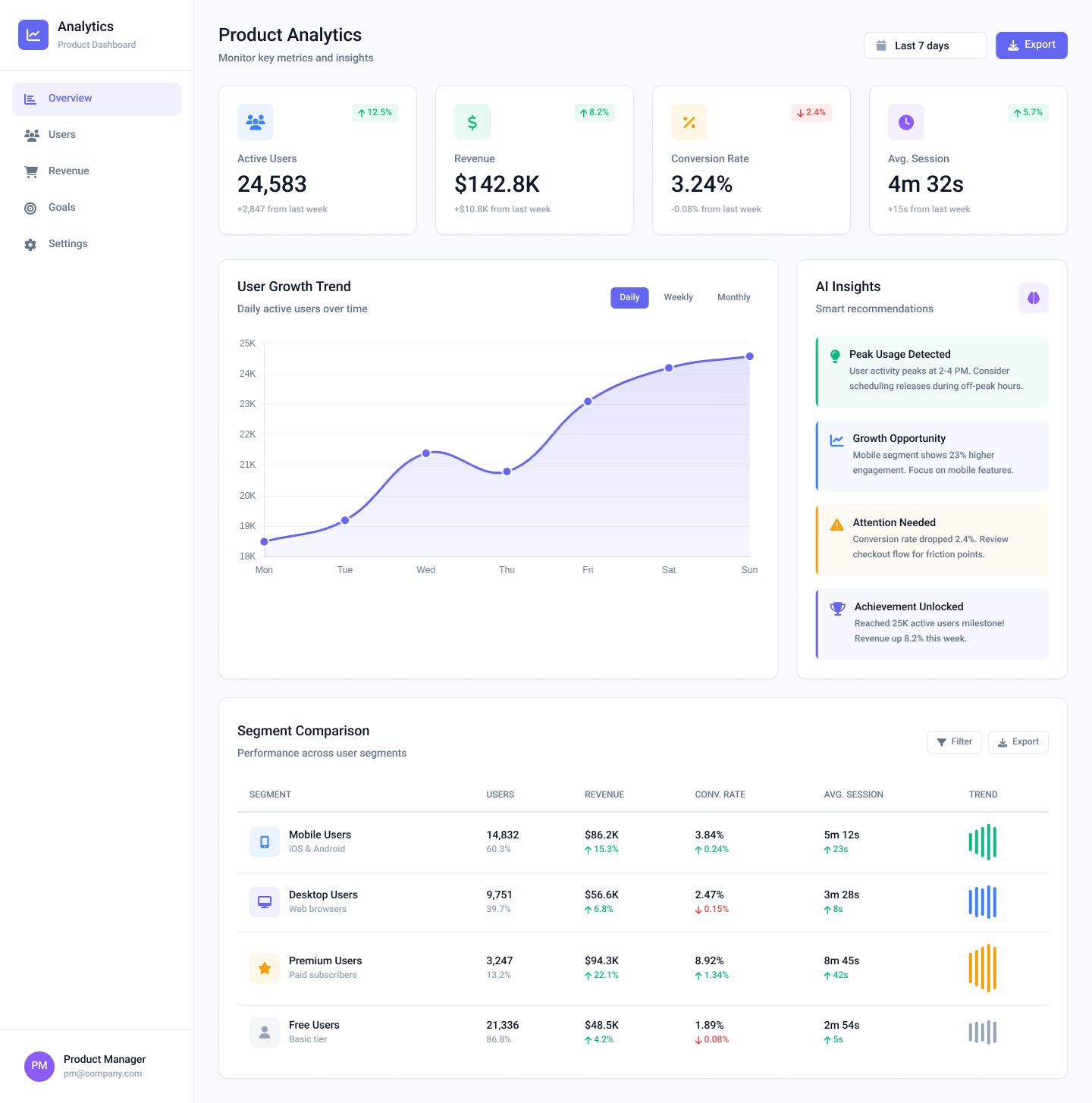
Dashboard layout is polished and highly readable with excellent visual hierarchy.
AI Insights cards are colorful, structured, and add strong product value context.
User Growth chart feels slightly flat and could benefit from more contrast or grid clarity.
Segment table trend visuals are helpful but could use clearer indicators or tooltips to improve scanning.
Reweb
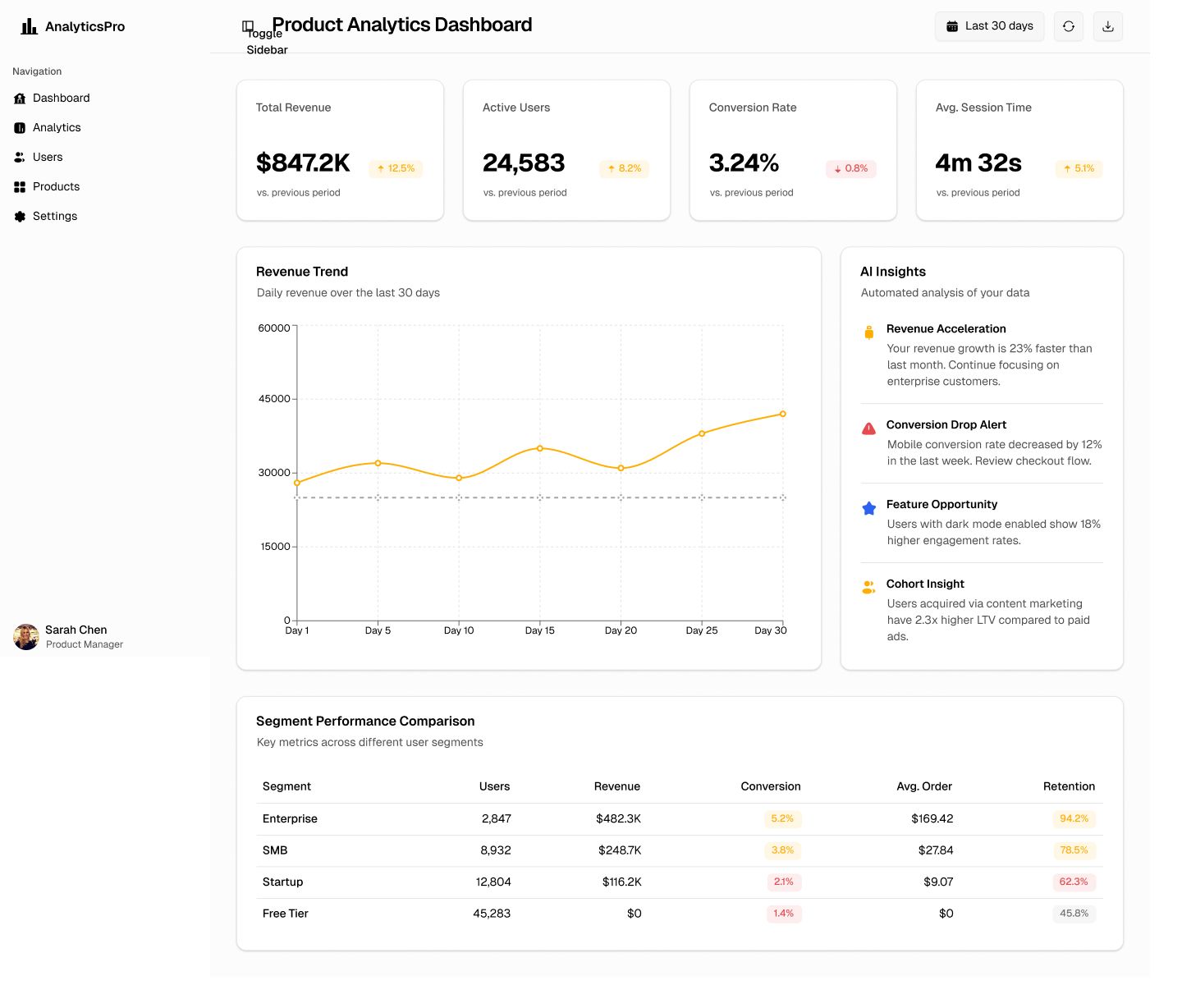
KPI cards are crisp, consistent, and highly readable with clear trend indicators.
AI Insights panel is well-organized with strong color coding and actionable clarity.
Revenue chart lacks visual clarity due to minimal styling and weak contrast.
Segment Comparison table feels flat and needs stronger visual grouping for readability.

UXMagic
UXMagic is an AI design copilot that converts prompts, sketches, screenshots, or URLs into fully formed design assets and production artifacts. It emphasizes speed and versatility: idea → wireframe → high-fidelity mockup → export. UXMagic integrates with Figma and provides multi-platform export options (React/HTML today, with Webflow/WordPress support on the roadmap). Explore UXMagic capabilities today.

Reweb
Reweb is a focused AI visual builder optimized for developer workflows. Its core promise: high-fidelity, production-ready Next.js + Tailwind CSS + shadcn/ui code. Reweb targets engineering teams and agencies that prioritize code purity, maintainability, and a predictable output. If you value auditable, idiomatic code over broad export options, Reweb is engineered for that mission.
Feature Comparison
| Feature | UXMagic | Reweb |
|---|---|---|
| Prompt to UI | Converts text/sketch/URL to polished Figma designs and React/HTML prototypes quickly. | Accepts prompts and Figma imports; focused on generating componentized UI for the chosen stack. |
| Image/Sketch/URL input | Strong support for sketches, screenshots, and URL→UI cloning for fast ideation. | Works best with Figma imports and clear design inputs; less geared to raw sketches. |
| Export Options | Exports to Figma & React/HTML today, roadmap for Webflow/WordPress/Shopify. | Direct export to production Next.js + Tailwind + shadcn/ui code (deployable). |
| Style Guide & Tokens | Applies and propagates style guides and tokens across generated screens. | Enforces opinionated design tokens matching Tailwind + shadcn conventions. |
| Figma Plugin | Companion Figma plugin to sync generated screens with design workflows. | Strong Figma import/export pipeline and editor-to-code flow. |
| Real-Time Preview | Live previews for generated pages and export targets (preview builds). | Live visual editor that reflects code changes; preview optimized for Next.js outputs. |
| Developer Handoff | Tokens and multi-format exports that reduce handoff friction across platforms. | Produces idiomatic code that developers can drop into a Next.js/Tailwind codebase. |
UXMagic
Pricing Comparison

Free – $0
30 free credits 5 Projects Up to 5 screens 1 Figma export UI design Wireframe mode Sectional editing
Premium – $17.5/month
480 credits 20 Projects Up to 80 screens 80 Figma exports Export code UI Design Wireframe Flows Screenshot to UI Sketch to UI Text Editing & upload images Sectional Editing
Ultimate – $35/month
4801500 credits Unlimited Projects Up to 250 screens 250 Figma exports Import Figma components/Design systems Clone a site Export code UI Design Wireframe Flows Screenshot to UI Sketch to UI Text Editing & upload images Sectional Editing

Free – $0
1 project Limited AI usage Unlimited code exports
Pro – $17/month
Unlimited projects 50x Higher AI limits Purchase additional credits Unlimited code exports
Team – $25/month
Everything in Pro Team collaboration Even higher AI limits Priority support Centralized billing
Final Verdict
UXMagic is the choice for teams chasing speed, flexibility, and broad export reach. Reweb is the right tool when code quality, standardization, and developer trust are the primary objectives.
Choose UXMagic if your workflow is design-led, you need to convert rough ideas into testable prototypes fast, or you ship to multiple platforms. UXMagic’s agentic AI and Figma plugin make it a powerful copilot for designers, PMs, and agencies who prioritize iteration velocity and stakeholder alignment.
Choose Reweb when you need idiomatic, production-grade Next.js + Tailwind + shadcn/ui code out of the box. Reweb minimizes technical debt and is a strong match for engineering teams and CTOs who require auditable outputs and predictable engineering handoffs.
UXMagic wins on breadth and speed. Reweb wins on narrow, deep technical quality. If your roadmap needs both, use UXMagic for ideation and early mocks, and Reweb (or a Reweb-like pipeline) for final engineering-grade code — or evaluate a hybrid workflow where the tools hand off at the point where design becomes code.
got questions?we have answers.
UXMagic vs Reweb: designers will prefer UXMagic for rapid ideation, multi-input generation (prompts, sketches, URLs), and easy Figma integration.
UXMagic vs Reweb: developers focused on production quality and minimal refactor time will often prefer Reweb for Next.js/Tailwind/shadcn/ui-grade code.
UXMagic vs Reweb: UXMagic can generate React/HTML and reduce handoff friction, but Reweb’s opinionated Next.js/Tailwind output is typically higher fidelity for production and auditability.
Both platforms support Figma import/export. UXMagic focuses on Figma → design plus multi-platform export; Reweb is engineered for Figma → production developer code (a true “Figma to builder” developer pipeline).



Related comparisons
Weighing up more than one tool? Here is how UXMagic compares against the closest alternatives.