
TL;DR
How should an enterprise assess the security, privacy, governance, and scalability of an AI UI design generator? We recommend assessing the complete service and operating model—not the quality of its best generated screen. Map every data flow, verify claims with evidence, test controls in a configured tenant, stress representative workflows, and turn critical assurances into contractual commitments. Use a weighted scorecard, but never let a high total score override an unresolved critical risk.
How Should an Enterprise Assess the Security, Privacy, Governance, and Scalability of an AI UI Design Generator?
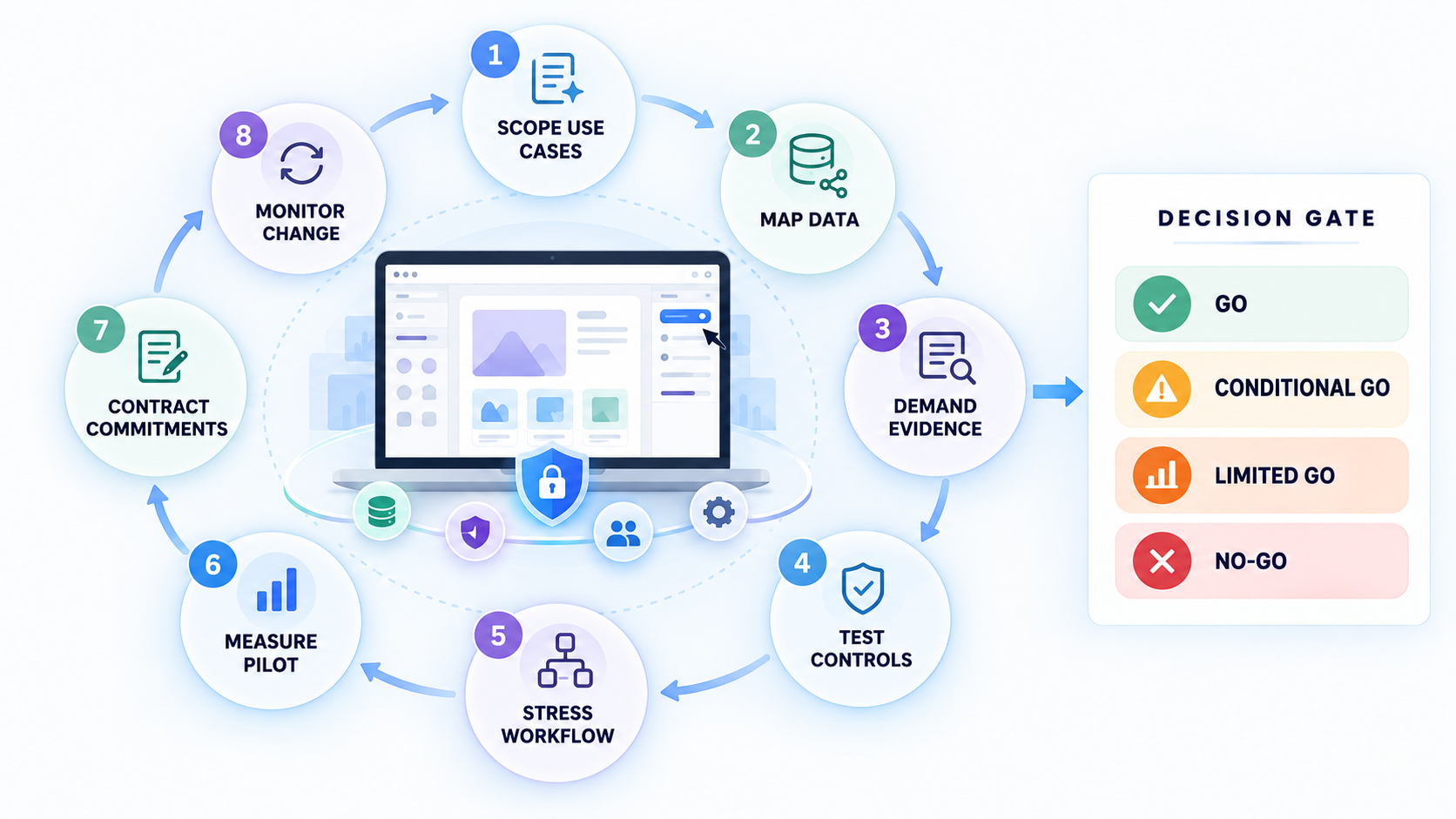
An enterprise should assess the complete AI UI design service and its operating model, not merely the visual quality of generated screens or the capabilities of the underlying model. “Enterprise-ready” is not a security control. If a vendor cannot explain what happens to each prompt, screenshot, component, generated interface, and export, we are evaluating marketing rather than risk.
The best AI UI generator is not necessarily the one that produces the most impressive first result. It is the one design teams can use at scale without bypassing security, privacy, governance, accessibility, design-system standards, or accountable human review.
We recommend an eight-step evaluation sequence:
- Scope the use cases. Define intended users, data classes, workflows, integrations, regions, and downstream uses.
- Map the data. Trace prompts, uploads, generated assets, metadata, telemetry, exports, logs, and support data.
- Demand evidence. Collect architecture documents, audit reports, policies, test results, contractual terms, and subprocessor details.
- Test the controls. Validate identity, isolation, permissions, deletion, logging, incident response, and AI-specific defenses.
- Stress the workflow. Test design systems, accessibility, collaboration, exports, administration, concurrency, and failure recovery.
- Measure a pilot. Compare productivity gains with defects, rework, policy exceptions, support burden, and administrative effort.
- Contract the commitments. Put material data-use, security, service, support, portability, and notification promises into enforceable terms.
- Monitor change. Reassess when models, features, subprocessors, regions, integrations, architecture, or intended uses change.
The assessment should produce one of four decisions:
- Go: Mandatory evidence and thresholds are satisfied for the intended configuration and use cases.
- Conditional go: Approval depends on defined configuration changes, compensating controls, or time-bound remediation.
- Limited go: Use is restricted by data class, team, region, role, feature, integration, or workflow.
- No-go: Critical risks remain unresolved, evidence is unreliable, or the service cannot support the intended operating model.
A weighted score supports comparison, but it does not replace judgment. Credible cross-tenant exposure, unclear training use, failed deletion commitments, weak identity controls, or unresolved critical vulnerabilities should override a strong aggregate result.
Use a Weighted Enterprise Scorecard
A practical enterprise scorecard should balance technical safeguards with operational fit. One useful starting point is:
- Security: 25%
- Privacy: 20%
- Governance: 20%
- Scalability: 20%
- Design workflow and accessibility: 15%
These are planning weights, not universal benchmarks. We recommend adjusting them to the proposed use. Low-risk concept exploration may place more emphasis on workflow quality, while sensitive or regulated product development should increase the weight and mandatory thresholds for security, privacy, accessibility, and governance.
Score evidence maturity rather than relying on yes-or-no answers:
- Insufficient: No meaningful answer or evidence exists.
- Claimed: The vendor makes an assertion without supporting documentation.
- Documented: Current policies, diagrams, or technical documentation support the claim.
- Independently assessed: A relevant external assessment covers the claimed control.
- Tenant-validated: The enterprise has tested the control in its intended configuration.
- Contractually verified: The material commitment is enforceable through the agreement.
Not every requirement needs the highest maturity level. Critical requirements often do, especially where a control cannot be fully observed through tenant testing.
Set pass thresholds before product demonstrations. Otherwise, attractive output can create confirmation bias and encourage teams to explain away foundational gaps.
We also recommend establishing stop conditions before scoring begins. These should include risks that cannot be averaged away, such as unverifiable tenant isolation, ambiguous rights to reuse confidential inputs, or the absence of workable enterprise offboarding.
Define the Assessment Team and Decision Rights
An AI design tool evaluation crosses organizational boundaries. It should involve representatives from:
- Design and design systems
- Product management
- Engineering
- Security
- Privacy
- Legal
- Procurement
- IT and identity administration
- Accessibility
- Compliance
- Platform or workspace administration
The assessment still needs one accountable decision owner. A committee without a named owner can collect evidence without resolving trade-offs. A single business sponsor without specialist blocking authority can approve risks they are not qualified to accept.
Give relevant specialists authority to pause or block deployment when critical evidence is absent. Security should be able to stop credible isolation risks. Privacy should be able to stop undefined training use. Accessibility specialists should be able to stop high-risk journeys that have not received adequate validation.
Maintain an evidence register for every material requirement. At minimum, record:
- Requirement and risk addressed
- Evidence reviewed
- Tenant configuration tested
- Test result
- Residual risk
- Compensating control
- Accountable owner
- Remediation deadline
- Review date
- Final disposition
This creates a defensible decision without turning procurement into an endless questionnaire. We prefer to reuse evidence across security, legal, privacy, design, and procurement rather than asking the vendor for the same information in several formats.
Map Every Data Flow Before Reviewing Security Claims
Start with the information the platform will actually handle. An AI UI generator may process far more than typed prompts, including:
- Product screenshots and reference interfaces
- User research and journey descriptions
- Design files and prototypes
- Component libraries
- Tokens, variables, and brand assets
- Generated screens, copy, images, and code
- Comments, approvals, and version histories
- User and workspace metadata
- Usage telemetry and diagnostic logs
- Integration credentials and events
- Exported files and code
- Support tickets, recordings, and attachments
Trace each category from collection through processing, storage, sharing, export, archival, and deletion. Identify where data is copied, transformed, logged, cached, backed up, reviewed by people, or transferred to another provider.
A useful diagram should name the application vendor, hosting providers, model providers, subprocessors, integrations, support systems, storage regions, and authorized personnel. It should also show authentication boundaries, administrative access, encryption points, retention periods, and deletion paths.
Classify representative use cases before testing. A blank marketing-page concept made from public information does not present the same risk as an unreleased financial workflow built from customer research and proprietary components.
Consider one end-to-end scenario: a designer enters a confidential product concept, uploads a product screenshot, generates several screens, applies a component library, invites an agency reviewer, exports the design, and passes it to engineering. The project is later archived and deleted.
For that scenario, ask:
- Which systems receive the prompt and upload?
- Which model processes them?
- What persists after generation?
- Who can access the project?
- What does the agency guest retain after removal?
- What metadata accompanies the export?
- Which logs or backups remain after deletion?
- What evidence shows that the deletion request propagated?
Without this map, we cannot evaluate security and privacy claims against the workflow that matters.
Separate Low-Risk Ideation From Sensitive Production Work
Create risk tiers based on data sensitivity, user impact, regulatory exposure, and downstream use. Do not classify risk by job title, team reputation, or enthusiasm for the tool.
A simple tiering model can distinguish among:
- Low risk: Public information, fictional content, generic layouts, and disposable ideation.
- Moderate risk: Internal product concepts, sanitized research, approved brand assets, and nonproduction design-system elements.
- High risk: Confidential roadmaps, unreleased product flows, sensitive user research, proprietary components, or interfaces affecting consequential decisions.
- Prohibited unless explicitly approved: Production credentials, secrets, unredacted customer data, regulated records, live authentication tokens, or data outside the vendor’s approved processing scope.
Preapprove safe data classes so routine design work remains fast. More sensitive work may require restricted workspaces, tighter roles, additional review, regional controls, or disabled sharing and export functions.
Make the policy visible where designers work. A PDF hidden in a compliance portal will not prevent accidental uploads under deadline pressure.
The goal is proportionate governance. Treating every sketch like a regulated production workflow creates enough friction to encourage shadow AI. Treating every prompt like harmless ideation exposes confidential concepts and personal data.
Verify the Deployed Architecture and Shared-Responsibility Boundary
Request current architecture and data-flow diagrams for the exact service being evaluated. The diagrams should match the intended region, model, plan, features, integrations, and tenant configuration.
Generic cloud diagrams are inadequate when the enterprise product uses different identity services, storage systems, model providers, or support processes. Ask the vendor to date and version the documentation.
For each safeguard, record whether it is:
- Automatic and always enabled
- Configurable by a tenant administrator
- Dependent on customer configuration
- Dependent on an external integration
- Performed manually
- Available only on a specific plan
- Unavailable
This exercise defines the shared-responsibility boundary. For example, the vendor may support SSO while the customer remains responsible for enforcement, group mapping, role design, emergency access, and offboarding.
A private model deployment is not automatically safer. Weak identity controls, excessive retention, insecure integrations, broad support access, or poor administration can outweigh the theoretical benefit of a dedicated hosting arrangement.
We assess architecture as a system. Hosting language alone does not establish effective security.
Test Security Controls With Evidence, Not Labels
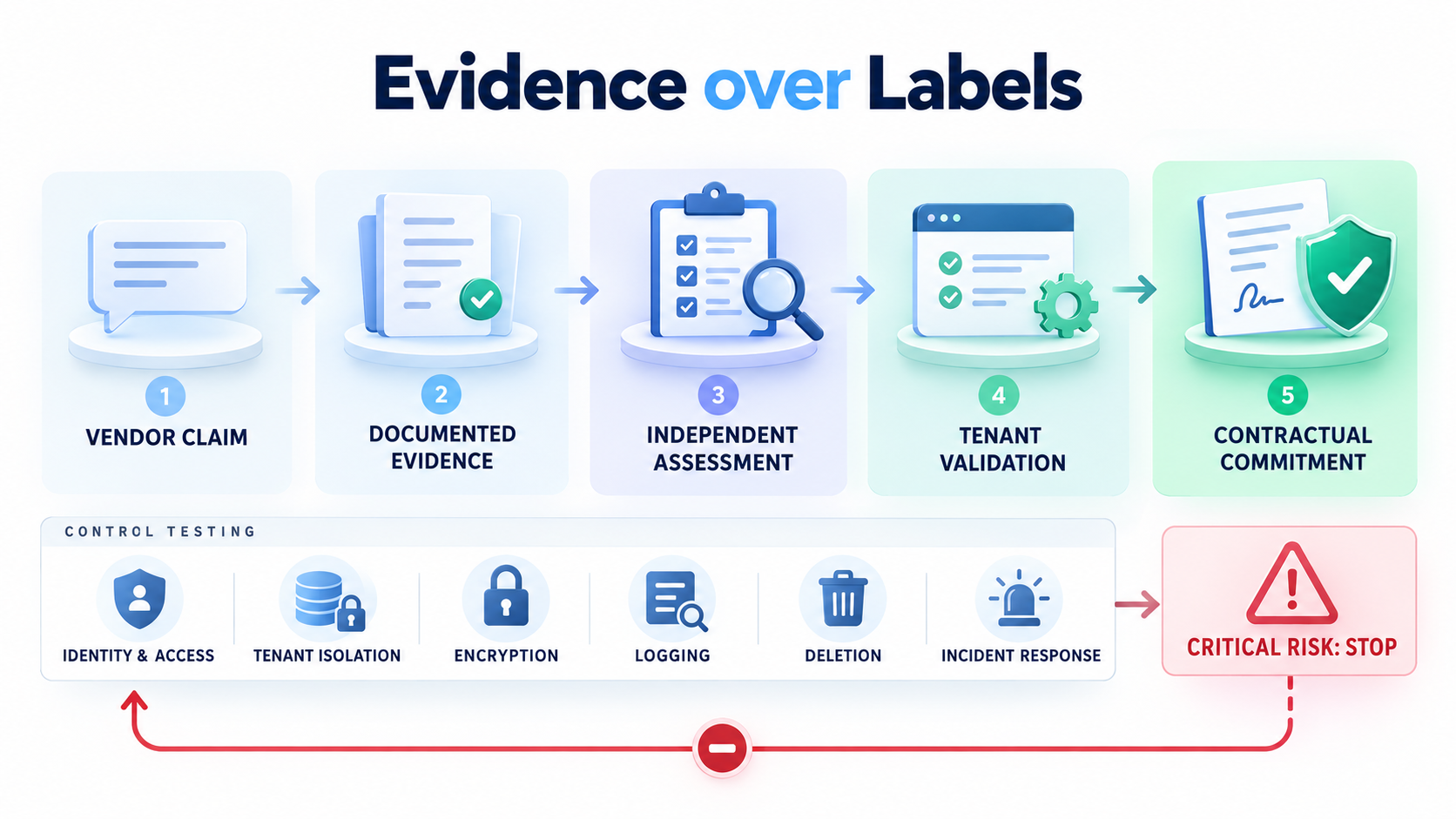
A credible enterprise AI security assessment needs more than a trust-center page. Request evidence that allows specialists to evaluate both control design and operating effectiveness.
The evidence package should include:
- Relevant audit reports and management responses
- Penetration-test scope and executive summaries
- Open findings and remediation status
- Security and access-control policies
- Vulnerability-management processes
- Secure development practices
- Incident-response procedures and relevant history
- Architecture and data-flow diagrams
- Business continuity and recovery documentation
- Current subprocessor coverage
- Data-deletion and backup procedures
Verify encryption in transit and at rest, tenant isolation, key and secrets management, secure development, change control, logging, backup protection, vulnerability handling, deletion, and incident response. Where a control cannot be directly tested, require stronger independent or contractual evidence.
Map each certification or audit to its actual scope. Check:
- Audit period
- Covered legal entity
- Covered service and environment
- Included regions
- Relevant control objectives
- Exceptions and qualified findings
- Complementary customer controls
- Subservice organizations
- Treatment of model providers
- Changes since the report period
SOC 2 is useful evidence, not automatic approval. Its value depends on what was examined, when it was examined, which systems were covered, what exceptions were reported, and whether the evaluated service matches the product being purchased.
This evidence-based approach aligns with broader governance resources such as the NIST AI Risk Management Framework and ISO/IEC 42001, both referenced in the source material. The practical enterprise question is narrower: do the documented controls work for this configured AI-assisted design workflow?
Run AI- and Workflow-Specific Threat Tests
Traditional application testing is necessary, but it may not cover risks introduced by natural-language prompts, uploaded design files, generated code, or model-connected integrations.
Run controlled tests for:
- Direct and indirect prompt injection
- Hidden instructions in uploaded files
- Malicious file metadata
- Unsupported or malformed file types
- Unintended disclosure of prior content
- Cross-workspace or cross-tenant access
- Insecure generated code patterns
- Unsafe links or external resources
- Excessive integration permissions
- Data exposure through previews or sharing links
- Unauthorized retrieval through search
- Leakage through logs or error messages
Use synthetic data and written rules of engagement. Do not target other customers, test production systems without authorization, or attempt to retrieve genuine confidential information.
One useful exercise places unique synthetic markers in prompts and sanitized uploads. Review whether those markers appear unexpectedly in another workspace, logs, support views, exported assets, or later generation.
Generated code also requires review. A visually convincing screen may contain insecure patterns, weak validation assumptions, unsafe dependencies, exposed secret placeholders, or misleading authentication behavior.
Every finding should have:
- Severity
- Reproduction details
- Affected configuration
- Accountable owner
- Remediation target
- Retest result
- Residual-risk decision
A verbal assurance that an issue is “unlikely” is not remediation.
Define Security Stop Conditions
Define conditions that pause or fail the assessment regardless of the overall score. Appropriate stop conditions include:
- Credible cross-tenant or cross-workspace exposure
- Unresolved critical vulnerabilities
- Unverifiable tenant isolation
- Materially misleading security evidence
- Missing incident-response processes
- Uncontrolled privileged access
- Inability to revoke access reliably
- Security logging that cannot support investigation
- Critical generated-code risks without workable review controls
Conditional approval is appropriate only when configuration changes, compensating controls, restricted data, or time-bound remediation can reduce exposure to an accepted level. A condition must have an owner and deadline. Otherwise, it becomes an undocumented permanent exception.
Contractual incident terms should match business dependence. Define notification requirements, security contacts, escalation routes, investigation cooperation, evidence preservation, remediation duties, and post-incident reporting.
Clarify what constitutes an incident. If the definition excludes model-provider events, unauthorized support access, or loss of generated assets, the notification commitment may provide less protection than it appears to.
Verify Privacy, Training Use, Retention, and Deletion
“We do not train on your data” is incomplete unless the agreement defines both “train” and “your data.” The commitment should address prompts, screenshots, design files, component libraries, generated assets, metadata, telemetry, logs, support content, human review, derived data, and every model provider.
Review the data processing agreement alongside product settings and technical documentation. Determine:
- Controller and processor roles
- Purposes of processing
- Data categories and data subjects
- Authorized subprocessors
- Cross-border transfer mechanisms
- Available storage and processing regions
- Data-subject request support
- Breach obligations
- Audit rights
- Return and deletion terms
Require retention periods by category. A platform may delete project content while keeping account metadata, security logs, support attachments, backups, or model-provider records under different schedules.
Distinguish storage location from processing location. A regional storage commitment does not necessarily mean prompts remain in that region during model inference, support access, monitoring, backup, or incident investigation.
Public privacy language can change. For enterprise tenants, product settings and contract terms should override weaker or more changeable website statements.
Make No-Training Commitments Testable
Define these terms contractually:
- Training
- Fine-tuning
- Evaluation and benchmarking
- Abuse monitoring
- Service improvement
- Human review
- Annotation
- Derived or de-identified data
- Model-provider processing
- Product analytics
A vendor may truthfully state that it does not train a foundation model while still using content for evaluation, service improvement, annotation, or abuse monitoring. Those uses may be reasonable, but they must be visible, bounded, and approved.
Confirm whether data-use restrictions apply by default to enterprise tenants or require an administrator to opt out. Verify that the restriction propagates to subprocessors and model providers rather than stopping at the application vendor.
New features can create new data uses. Require advance notice and review rights for material changes to models, subprocessors, processing purposes, human review, or data residency.
Where the vendor relies on de-identified or aggregated data, examine the definition and safeguards. Removing a user’s name may not adequately protect a distinctive unreleased interface or proprietary component library.
Test Deletion and End-of-Contract Handling
Deletion must be evaluated as a workflow, not a button. Verify what happens across:
- Active databases
- Object storage
- Search indexes
- Caches
- Logs
- Backups
- Support systems
- Analytics platforms
- Integrations
- Model-provider systems
- Disaster-recovery environments
Use a unique synthetic marker in a sanitized project, delete the project, and request evidence showing how deletion propagates. The vendor may not be able to expose every internal system, but it should explain the process, timelines, exceptions, and verification method.
Define backup exceptions and legal-hold behavior. Data that remains in immutable backups should be isolated from ordinary use and expire under a documented schedule.
End-of-contract terms should address data return, export windows, administrator access, deletion certification, outstanding support cases, and subprocessor deletion. The enterprise should be able to export design assets, metadata, histories, approvals, and required audit evidence before access ends.
Deletion also has governance consequences. Removing a design artifact should not unintentionally destroy evidence the enterprise must retain for an approval, incident, legal hold, or regulated release.
Govern Identity, Workspaces, Approvals, and Exports
Enterprise governance becomes real through identity and workflow controls. Evaluate SSO, MFA enforcement, SCIM provisioning, role-based access, least privilege, guest controls, service accounts, session management, device or network restrictions where needed, and offboarding.
Define who may:
- Generate designs
- Upload files
- Edit projects
- Comment or review
- Approve artifacts
- Invite collaborators
- Share public or private links
- Export designs or code
- Publish content
- Connect integrations
- Change policies
- Administer workspaces
- Delete or restore assets
Test these actions rather than relying on a role matrix. Create a user through SSO and SCIM, move that user between groups and roles, and then revoke access.
Verify session termination, workspace reassignment, asset ownership, integration tokens, shared links, audit events, and downstream access. Offboarding is incomplete if the user loses login access but an active integration or public share remains available.
Require workspace ownership, policy inheritance, environment separation, version history, audit logs, approval records, export controls, and ownership transfer. Logs should show who performed a material action, when it occurred, which artifact was affected, and whether the action succeeded.
Governance must remain usable. If approval is consistently slow, provisioning is manual, or approved tools cannot support ordinary component workflows, designers may move sensitive work into personal accounts and consumer services.
Design Roles Around Actions and Risk
Test representative designer, reviewer, administrator, guest, contractor, and service-account roles in the configured tenant. Generic “member” and “admin” roles may be too broad for a multi-team deployment.
Separate duties where risk justifies it. Workspace administration does not always require access to global security settings, billing, audit configuration, or high-risk exports.
A workable enterprise role model may distinguish among:
- Designers who generate and edit
- Reviewers who comment but cannot export
- Approvers who accept defined artifact versions
- Workspace owners who manage local membership
- Security administrators who manage global controls
- Integration accounts with narrow API scopes
- Guests with project-specific, time-limited access
- Export approvers for restricted data classes
Delegated administration is essential at scale, but delegation should not grant unrestricted global access. Test whether local owners can manage their teams while central administrators retain policy and evidence visibility.
Test failure paths as well. An unauthorized action should be clearly denied, logged, and explained without exposing sensitive information.
Prevent Shadow AI Without Blocking Design Work
More governance can create more shadow AI. The safe path must also be practical.
Embed policy into the design workflow through:
- Upload guidance
- Prohibited-data warnings
- Preapproved templates
- Approved component libraries
- Restricted workspaces
- Clear sharing labels
- Fast escalation routes
- Role-based policy prompts
- Office hours and training
Measure provisioning time, approval latency, denied actions, policy exceptions, and known use of unapproved alternatives. We treat these as governance health indicators, not merely user-experience metrics.
Remove friction that does not reduce material risk. Repeated manual approvals for public-data ideation can be simplified, while controls protecting sensitive uploads or external exports should remain enforceable.
An approved AI UI generator for editable design workflows should help teams move from description to structured output without forcing them into disconnected copy-and-paste processes. That speed is useful only when identity, data handling, and review controls remain intact.
Validate Design Systems, Accessibility, and Human Review
A polished demonstration does not prove the platform can support an enterprise design system. Use sanitized versions of the organization’s real components, tokens, variables, responsive patterns, themes, brands, languages, and interaction states during the pilot.
Score the results for:
- Component reuse
- Token and variable fidelity
- Responsive behavior
- Theme support
- Localization and text expansion
- Error and empty states
- Loading and disabled states
- Version compatibility
- Unsupported deviations
- Exception management
Test more than the default happy path. Generate forms with validation, dense data views, permission errors, long translated strings, high zoom, alternate themes, and narrow screens.
Accessibility evaluation should include WCAG-relevant behavior such as semantics, keyboard operation, focus visibility and order, contrast, zoom, screen-reader sampling, dynamic states, labels, instructions, and validation messages.
Automated checks and attractive screens do not certify a final product as accessible, secure, compliant, inclusive, or production-ready. They can identify potential issues and accelerate repetitive work, but qualified people must validate the implemented experience.
We approach shippability as a lifecycle problem, not an image-generation problem. Our guidance on creating AI-assisted UI that is actually shippable explains why editable structure, review, and downstream implementation matter as much as the initial output.
Test the Design-to-Development Lifecycle
Trace a generated artifact through:
- Generation
- Editing
- Design-system review
- Accessibility review
- Product approval
- Export
- Engineering implementation
- Repository controls
- Automated and manual testing
- Deployment
- Monitoring
- Maintenance and deprecation
Check whether the export preserves structure, metadata, component intent, accessibility information, and version traceability. A flattened output may look accurate while creating substantial engineering rework and weakening governance.
When Figma is part of the operating model, test the complete AI-to-Figma conversion and review workflow, including editable layers, component mapping, ownership, comments, versions, and handoff. The artifact should remain understandable after it leaves the generator.
Identify where new defects can enter. Downstream code, content systems, third-party components, authentication, analytics, consent management, experiments, personalization, and localization can all alter the final experience.
Maintain a clear shared-responsibility boundary:
- The generator assists with creation and may provide checks.
- The customer configures components, permissions, standards, and workflows.
- Designers and specialists validate the artifact.
- Engineers validate the implementation.
- Product owners accept release and residual risk.
- Operational teams monitor the deployed experience.
Link the exact artifact version tested to the implementation version released. Otherwise, approval evidence may refer to a design that changed before deployment.
Make Human Review an Enforceable Release Gate
Assign accountable reviewers according to the use-case risk tier. Relevant review may include:
- Design-system fidelity
- Accessibility
- Security
- Privacy
- Engineering quality
- Product suitability
- Content and localization
- Regulatory or compliance obligations
Do not treat detected issues as resolved issues. Track findings through remediation, retesting, approval, and release.
Every exception should identify:
- Exact artifact or implementation version
- Issue and severity
- Affected users or workflows
- Compensating control
- Remediation owner
- Deadline
- Approver
- Retest requirement
High-risk journeys need deeper review and stronger stop-release authority. Interfaces involving identity, authorization, healthcare, employment, financial decisions, essential services, or sensitive data should not inherit approval from a generic pilot.
Human review should focus on decisions automation cannot reliably make: whether the interface meets a real user need, whether it excludes or harms people, whether its behavior is understandable, and whether the shipped implementation satisfies the organization’s standards.
Prove Technical and Organizational Scalability
Scalability is not just model throughput. An AI design platform can fail at enterprise scale when administrators cannot provision users, apply inherited policies, trace activity, control costs, move assets, or support distributed teams consistently.
Evaluate technical capacity across:
- Latency
- Concurrency
- Throughput
- Storage
- Search performance
- Rate limits
- Uptime
- Regional availability
- Failover
- Recovery objectives
- Degraded modes
Use representative workloads rather than vendor benchmarks. The workload should reflect expected project sizes, component libraries, concurrent users, collaboration patterns, exports, automation, and integrations.
Test organizational scalability as rigorously as infrastructure:
- Bulk provisioning
- Workspace creation
- Group-to-role mapping
- Policy inheritance
- Delegated ownership
- Central reporting
- Cost controls
- APIs
- Integration limits
- Configuration export
- Support escalation
- Evidence retrieval
Model growth across users, projects, assets, brands, regions, languages, automation, and design-system versions. A small pilot with one administrator and a limited project set may not represent an eventual portfolio with distributed owners and multiple agencies.
Review available capabilities and plan boundaries before designing the pilot. A current feature overview for AI UI and Figma workflows can help teams identify which functions need direct tenant validation rather than assumption.
Stress Peak and Failure Conditions
Run concurrent generation, collaboration, search, export, and administrative operations. Measuring one isolated prompt under ideal conditions is not a meaningful enterprise performance test.
Observe:
- Queue behavior
- Timeouts and rate-limit messages
- Retry behavior
- Duplicate operations
- Lost or partially saved work
- Collaboration conflicts
- Export failures
- Audit-log continuity
- Unexpected cost increases
- Recovery after interruption
Test identity-provider disruption, model-provider degradation, integration failure, and interrupted exports. Determine whether users receive accurate status information and whether administrators can identify affected projects.
Match service levels to the functions teams depend on. A headline uptime figure may exclude authentication, generation, collaboration, export, integrations, or audit access.
Define acceptable degraded modes. If generation is unavailable, can teams still access and export existing assets? If audit services are delayed, are events preserved and delivered later? If an integration fails, does the platform prevent silent data loss?
Failure testing also reveals support quality. During the pilot, evaluate response time, escalation competence, status transparency, workaround quality, and time to verified recovery.
Assess Portability, Resilience, and Total Cost
Portability covers more than image or code export. Test whether the enterprise can retrieve:
- Designs and source files
- Component relationships
- Metadata
- Version histories
- Comments and approvals
- Permissions
- Audit evidence
- Workspace configuration
- Policy settings
- Integration records
Assess whether export formats are documented, usable, and available without vendor intervention. APIs should have workable scopes, pagination, rate limits, authentication, and documentation.
Estimate total cost across:
- Licensing
- Usage or generation charges
- Integrations
- Administration
- Training
- Support
- Accessibility and security review
- Remediation
- Design-system maintenance
- Incident response
- Migration and exit
Model pricing against representative usage, not the smallest pilot. Review the available plan and pricing structure alongside expected users, usage, support requirements, and enterprise controls.
Define continuity and exit plans for outages, acquisition, insolvency, service discontinuation, poor performance, or strategic migration. Name the owner, required exports, alternative workflows, recovery priorities, and acceptable loss of functionality.
A platform is not scalable if leaving it would require reconstructing approvals, metadata, and ownership manually.
Run a Time-Boxed Pilot and Make a Defensible Decision
Run a representative pilot using sanitized but realistic requirements. Include actual component patterns, roles, integrations, failure cases, accessibility needs, approval steps, and peak conditions.
Establish baselines and acceptance thresholds before the pilot begins. Otherwise, teams may redefine success around whichever results look most favorable.
Compare the platform with the current workflow. Measure the time required to reach a validated design—not merely the time needed to generate the first screen.
The pilot should include:
- Designers
- Design-system owners
- Product managers
- Engineers
- Administrators
- Security reviewers
- Privacy stakeholders
- Accessibility specialists
- Representative downstream users
Do not select only enthusiastic early adopters. Include the people who will administer, review, implement, and support the system after the initial champion moves on.
Conclude with a concise decision record. Executives should be able to understand what is approved, under which conditions, for which data and teams, and why.
Measure Value and Guardrails Together
Measure productivity and quality together:
- Time to validated design
- Component reuse
- Handoff defects
- Engineering rework
- Design-system deviations
- Adoption and completion rates
- Support burden
- Administrative effort
- Total cost
Track guardrail performance at the same time:
- Security findings
- Privacy exceptions
- Accessibility defects
- Unapproved uploads
- Approval latency
- Failed exports
- Policy exceptions
- Unresolved high-severity risks
- Use of unapproved alternatives
Generation volume is not a success metric by itself. Producing more screens can increase downstream cost when those screens require extensive correction or bypass shared components.
Collect structured feedback from designers, administrators, engineers, accessibility specialists, security teams, and downstream users. Separate usability preferences from control failures, but treat both as relevant to sustained adoption.
Pair every speed metric with a quality or risk metric. Faster generation should not be accepted if handoff defects, accessibility debt, support workload, or policy deviations rise materially.
Apply Go, Conditional-Go, Limited-Go, and No-Go Rules
Approve a full go only when mandatory evidence and critical thresholds are met in the intended configuration. Approval should specify the covered service, tenant, region, model, integrations, roles, and data classes.
Use conditional approval when identified remediation can be completed within an agreed period. Conditions need named owners, deadlines, interim safeguards, verification methods, and consequences for missed commitments.
Use limited approval for constraints such as:
- Public or sanitized data only
- Specific teams or regions
- No external guests
- Disabled code export
- Approved models only
- Restricted integrations
- Human approval before export
- Low-risk ideation only
Issue a no-go or pause for unresolved cross-tenant risk, unclear training use, missing deletion commitments, inadequate identity controls, unsupported critical integrations, unverifiable claims, or failed representative load tests.
Document rejected alternatives and residual risk. This prevents a later stakeholder from treating an old pilot result as unrestricted approval for a new workflow.
Contract the Commitments and Monitor Material Change
Translate important assurances into contract language. Public documentation and sales statements provide useful context, but they may not create enforceable protection.
The agreement should address:
- Permitted and prohibited data use
- Training, evaluation, and human review
- Retention and deletion
- Data residency and transfers
- Incident notification and cooperation
- Service levels
- Audit and evidence rights
- Subprocessor notice
- Model and feature changes
- Portability and export
- Support and escalation
- Remedies
- Termination assistance
Maintain an inventory of approved use cases, workspaces, integrations, data classes, exceptions, owners, and renewal dates. This inventory connects procurement approval to operational reality.
Reassess after material changes to models, features, subprocessors, regions, integrations, architecture, regulations, threat patterns, or business use. Point-in-time approval should not become a permanent exemption for capabilities that were never evaluated.
Treat renewal as a new evidence checkpoint. Review incidents, control performance, support quality, product changes, unresolved risk, contractual compliance, and realized value.
Create a Lightweight Continuous-Assurance Cycle
Continuous assurance should be proportionate to risk. High-risk workflows need more frequent review than public-data ideation.
Review the following on a risk-based schedule:
- Critical audit events
- Incidents and near misses
- Access and privileged roles
- Active guests and service accounts
- Policy exceptions
- Data-flow changes
- Deletion evidence
- Capacity and rate limits
- Service-level performance
- Support escalations
- Subprocessor and model changes
Require notification and approval before materially different data categories or workflows are introduced. A team should not be able to convert an approved ideation workspace into a repository for sensitive production research without review.
Define procedures for:
- Rollback
- Suspension
- Containment
- Investigation
- Evidence preservation
- User communication
- Remediation
- Retirement
The objective is not permanent bureaucracy. It is a repeatable control loop that catches meaningful change without forcing every routine design action through a central committee.
Keep the Decision Record Audit-Ready
Link each requirement to its evidence, tenant configuration, test result, contract language, residual risk, owner, deadline, and disposition. Avoid storing key decisions only in email threads or meeting notes.
Preserve dated versions of:
- Architecture documents
- Data-flow diagrams
- Policies
- Audit reports
- Subprocessor lists
- Scorecards
- Pilot results
- Approvals
- Exceptions
- Remediation evidence
Records should remain exportable and understandable after staff turnover, reorganization, merger, acquisition, or migration. A durable operating model cannot depend on the memory of the person who led the pilot.
Keep the final record concise enough to use. A strong decision document explains what was assessed, what was proven, what remains uncertain, which limitations apply, and when reassessment is required.
Enterprise AI Governance Principles for Design Teams
Enterprise AI governance should translate broad principles into observable design-team behavior. Frameworks can structure oversight, but prompts, screenshots, component libraries, generated interfaces, permissions, exports, and deletion still need concrete controls and owners.
Our practical sequence is straightforward: map the data, test the controls, verify the evidence, and then design and ship within the approved operating model.
What Is Enterprise AI Governance?
Enterprise AI governance is the set of decision rights, controls, evidence, and oversight used to manage AI throughout its lifecycle. It determines which uses are allowed, who is accountable, what safeguards apply, how performance is monitored, and when use must be restricted or stopped.
For AI-assisted UI design, governance covers prompts, uploads, generated screens, user permissions, approvals, exports, implementation, monitoring, retention, and deletion. It extends beyond procurement because risks change when designs enter codebases, production systems, and real user journeys.
Effective governance combines centralized standards with execution inside product teams. Broader governance guidance in the source material likewise emphasizes accountability, lifecycle checkpoints, structured risk assessment, monitoring, and human oversight.
What Should AI Governance Focus On?
We organize AI governance around three practical concerns: accountable use, protected data and systems, and continuous oversight.
Accountable use defines approved purposes, roles, decision rights, review gates, and risk acceptance. Protected data and systems cover data classification, access, isolation, secure processing, retention, deletion, and incident response.
Continuous oversight monitors incidents, exceptions, access, model changes, performance, and emerging risks. It also measures workflow adoption because controls that make approved work impractical can push designers toward shadow AI.
This model is a useful operating structure rather than a universal standard. Enterprises should adapt it to their regulatory duties, business risks, and established governance framework.
How Do We Secure AI in the Enterprise?
We secure enterprise AI by mapping data, classifying use cases, restricting access, verifying tenant isolation and encryption, testing AI-specific threats, monitoring activity, and preparing incident response.
These controls must be validated in the deployed tenant. Policies, certifications, and architecture claims are supporting evidence, but they do not prove that role mappings, integrations, sessions, deletion, and audit logs work in the intended configuration.
For UI generation, test malicious uploads, prompt injection, unintended disclosure, unsafe exports, insecure generated code, guest access, and offboarding. Repeat material tests after changes to models, features, integrations, or architecture.
Which AI Governance Practices Matter Most?
Use risk tiers, centralized standards, embedded team workflows, least privilege, traceable approvals, ongoing monitoring, and periodic reassessment. Assign one decision owner while allowing specialists to block critical risks within their areas of responsibility.
Keep humans accountable for final design, accessibility, engineering, release, and residual-risk decisions. Automation can accelerate creation and detect some problems, but it cannot establish that the implemented product is suitable, accessible, secure, or compliant in every context.
Governance should also remain usable. Preapproved components, clear data classes, rapid provisioning, understandable warnings, and proportionate review help make the safe workflow the easiest workflow.
Map, Test, and Verify—Then Design and Ship
Start with one representative workflow and build the evidence register before the demonstration. Map the data, test the configured tenant, stress the design-to-development lifecycle, document stop conditions, and approve only the operating model your enterprise can verify and govern at scale.
Explore UXMagic’s enterprise-ready AI UI and Figma workflow features and use this assessment framework to plan a controlled pilot.