UXMagic vs Onlook: Which AI Design Tool Wins in 2026?
Two powerful approaches. One critical decision. In this comparison, we’ll break down UXMagic vs Onlook—their features, pricing, pros, and who should use each. Whether you’re exploring onlook pricing, diving into onlook GitHub, or curious about how UXMagic stacks up against this open-source challenger, this page has you covered.


Output Comparison
Design a responsive SaaS dashboard with sidebar navigation, dark mode toggle, and activity feed.
UXMagic
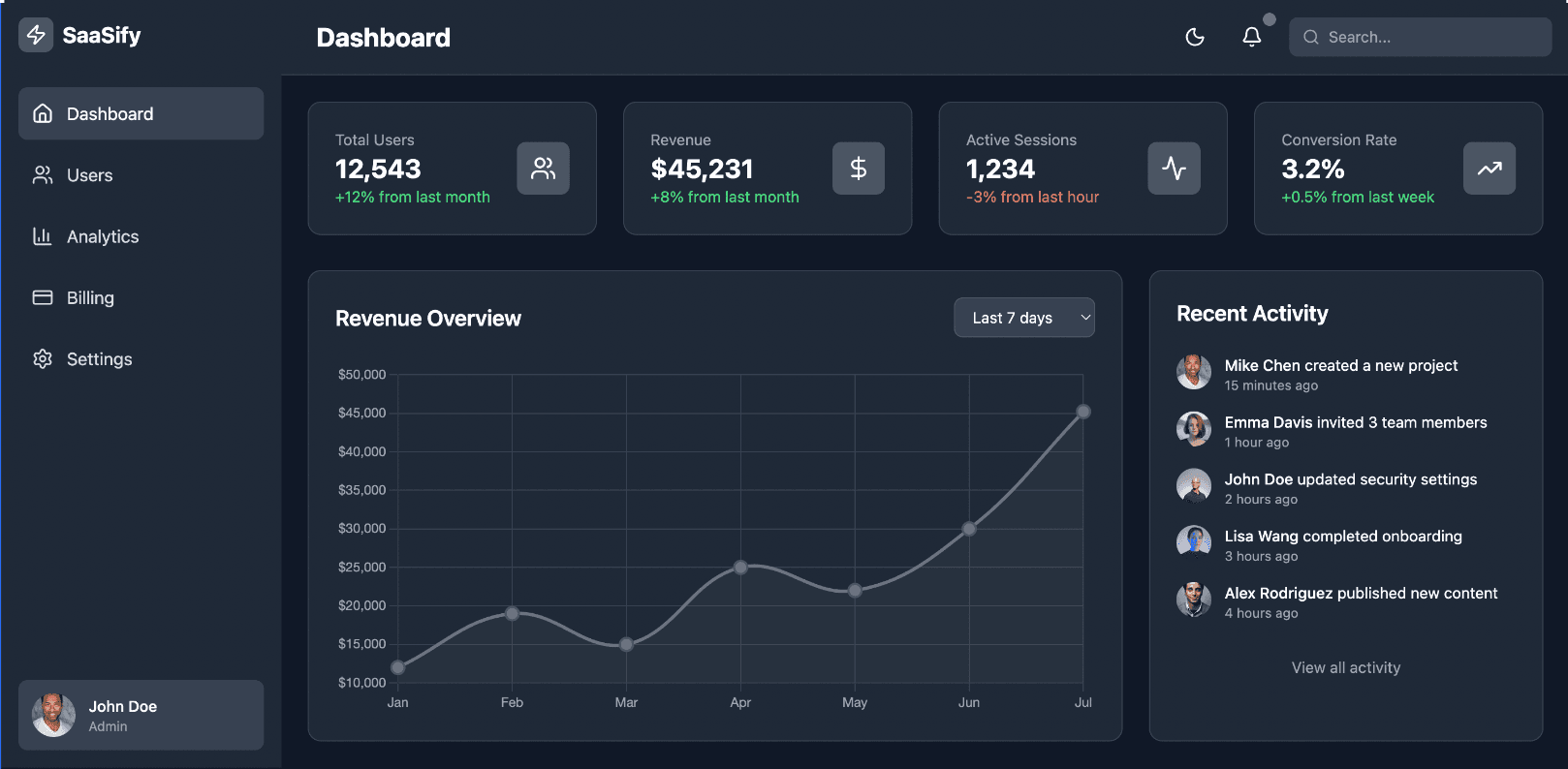
The interface is professional and clean, using a traditional dashboard layout with clear divisions for different data sections.
It provides a clear and straightforward overview of key metrics like 'Active Customers', 'Sales', and 'Revenue', making it easy for users to find essential information.
The design is very text and data-heavy, lacking more engaging visual elements like charts or graphs to represent trends over time.
The overall aesthetic is somewhat dated and generic, which may not create a strong or memorable brand identity.
Onlook
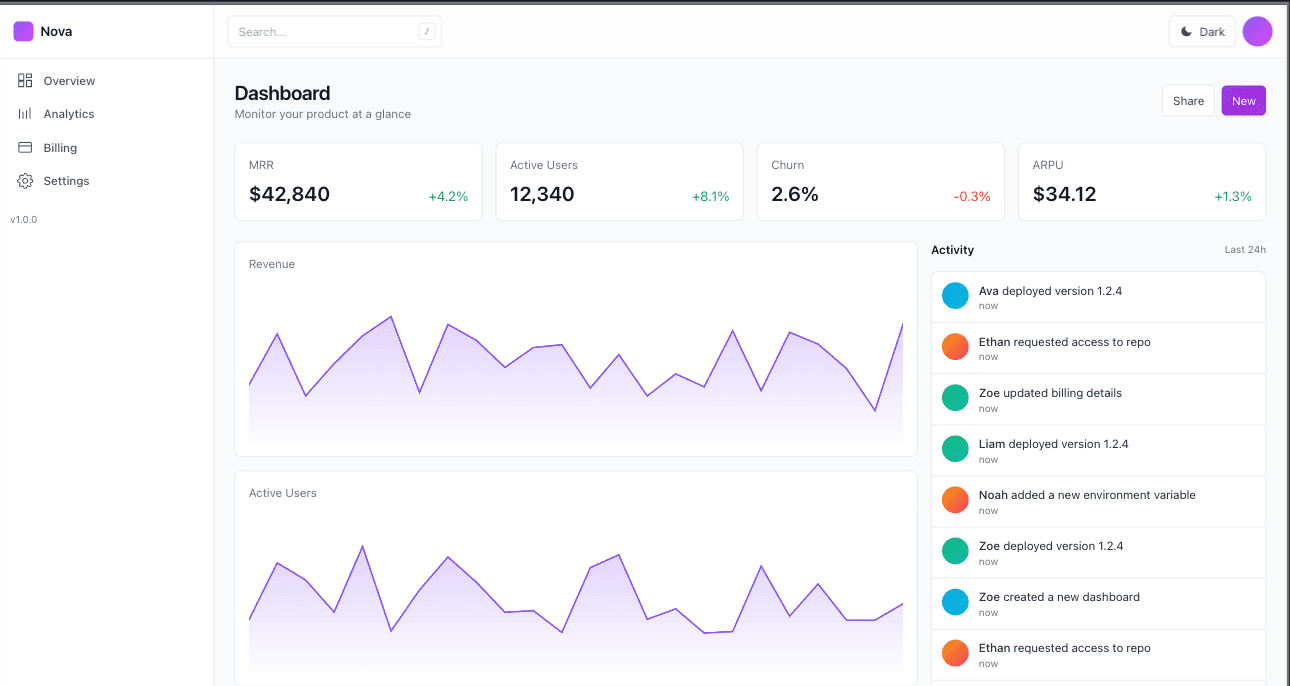
The design is modern and visually striking, using a vibrant color palette and a bold, illustrative graphic to create a distinctive brand identity.
It effectively uses a combination of data points and visuals to quickly convey insights, with charts that show trends for 'Active Users' and 'Revenue' at a glance.
The non-traditional, asymmetrical layout, while unique, could be less intuitive for users accustomed to standard dashboard structures.
The bright and busy visual style might be distracting and could make it harder for some users to focus on the raw data.
Generate a modern e-commerce product page with image gallery, size selector, and ‘add to cart’ button.
UXMagic

The design is modern and visually appealing, using a bright, contrasting color palette to draw attention to key elements like the 'Add to Cart' button.
It provides a clear and organized breakdown of product features with checkmarks, which builds trust and helps customers quickly understand the benefits.
The asymmetrical layout and background elements, while unique, might be distracting for users trying to focus on the product details.
The product thumbnails are placed in a less conventional way, which could be confusing for users who expect them to be placed below the main image.
Onlook
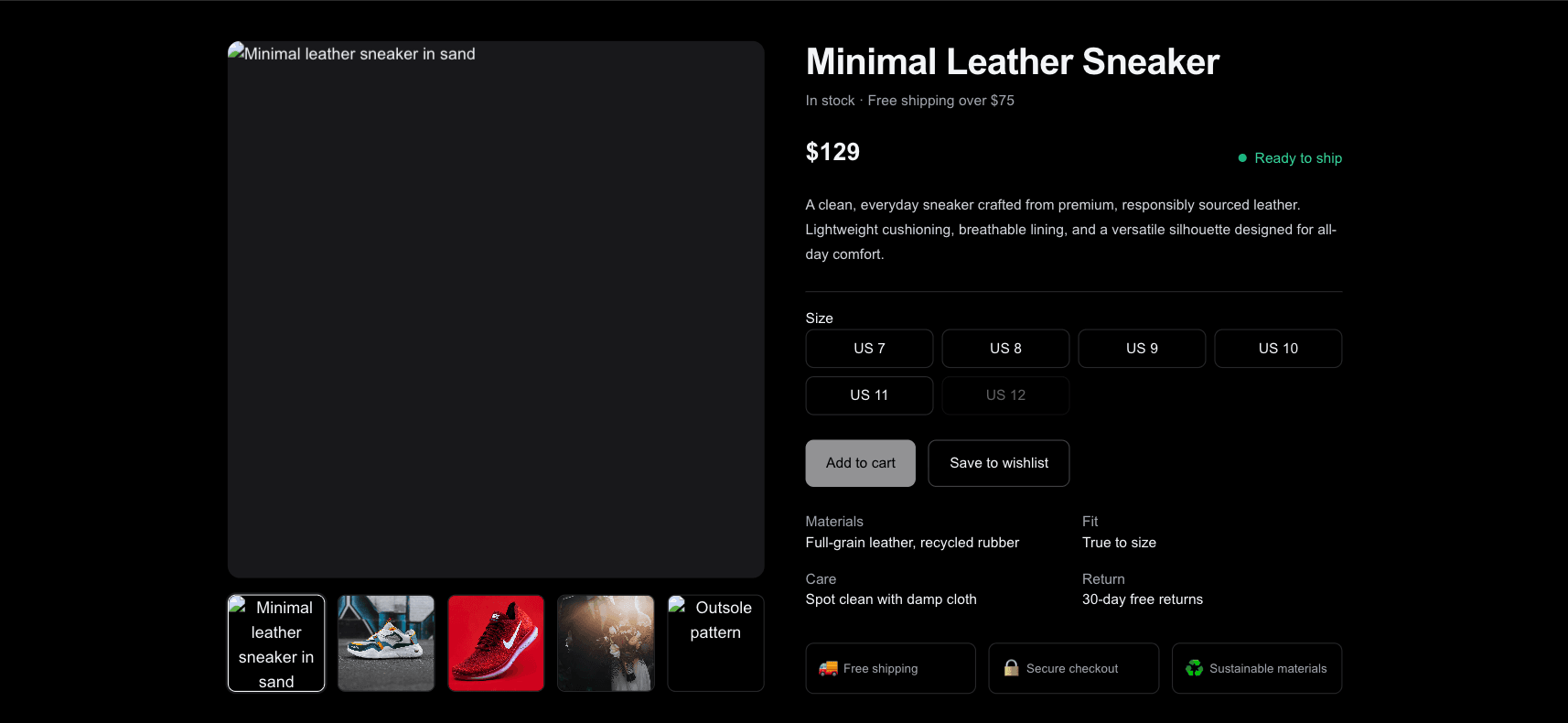
The design is simple, clean, and uses a dark theme effectively to make the product image and text stand out.
The product information is logically organized, with clear sections for size, quantity, materials, and care instructions.
The overall layout is somewhat basic and might lack the visual dynamism or modern feel of more current e-commerce sites.
The product thumbnails below the main image are small, which makes it hard to see the details of the alternative views.
UXMagic
UXMagic is an AI-powered design copilot that accelerates UI/UX workflows. From wireframes to high-fidelity mockups, it generates Figma-ready designs and production-ready code. With support for inputs like text prompts, sketches, screenshots, and URLs, UXMagic makes design iteration lightning-fast. It’s a tool for designers, agencies, and startups looking to ship polished work quickly.
Onlook
Onlook is an open-source, AI-first visual code editor built for the React ecosystem. Instead of static mockups, it works directly on live React components. Designers and developers collaborate seamlessly through a bi-directional loop: visual edits sync into code, and code edits reflect instantly in the visual editor.
Feature Comparison
| Feature | UXMagic | Onlook |
|---|---|---|
| Prompt to UI | Turns text into full layouts instantly | Not prompt-based; edits live code directly |
| Style Guide | One-click apply & enforce consistency | Maintains dev-styled code, minimal style bloat |
| Component Editing | AI-assisted sectional edits + agentic assistant | Direct manipulation of live components |
| Team Features | Collaboration, multiple exports, credit-based usage | Real-time comments, version history, open-source ecosystem |
| Figma Plugin | Exports directly to Figma | Imports Figma → React components |
| Real-Time Preview | AI-generated interactive previews | Live React previews with state + data |
UXMagic
Pricing Comparison

Free – $0
5 project + 60 credits (~10 screens)
Premium – $14/mo
20 projects + 480 credits (~80 screens) + advanced exports
Ultimate – $28/mo
unlimited projects + 1, 500 credits (~250 screens) + URL-to-UI + system imports
Free – $0
20 projects, limited AI chat messages
Pro – $25/mo
unlimited projects, custom domains, team features
Enterprise –
Custom pricing, on-premise, premium support
Final Verdict
The UXMagic vs Onlook debate boils down to philosophy
Onlook: Best for developer-led teams committed to React/Next.js who want code-first control and open-source flexibility.
UXMagic: Best for design-first teams who need speed, versatility, and platform-agnostic exports.
If you’re building across multiple platforms and need rapid AI-generated outputs, go with UXMagic. If you’re all-in on React and want to eliminate design handoff, Onlook shines
got questions?we have answers.
UXMagic is output-first, generating designs/code from prompts, images, and URLs. Onlook is code-first, editing live React projects.
Yes, Onlook has a free tier with up to 20 projects. Paid tiers start at $25/month. Check the latest details under onlook pricing.
Yes. UXMagic supports Figma export and multiple platforms, while Onlook focuses on Figma imports into live React.
Agencies working on diverse projects benefit more from UXMagic’s versatility. Onlook is better for React-only agencies.
Yes. Since it’s open-source, Onlook has an active onlook GitHub community, with contributors enhancing its ecosystem.



Related comparisons
Weighing up more than one tool? Here is how UXMagic compares against the closest alternatives.